
Replacing the battery in a Ford F-150 key fob is a straightforward process that can be completed in just a few minutes. This guide will walk you through the necessary steps to ensure your key fob operates effectively.
Essential Tools for Ford F-150 Key Fob Battery Replacement
Before diving into the battery replacement process for your Ford F-150 key fob, it’s crucial to gather the right tools. Having the necessary equipment on hand will streamline the task and ensure a smooth experience. This section outlines the essential tools you’ll need to effectively replace the battery in your key fob.
Before starting the battery replacement, ensure you have the right tools and supplies. Having everything on hand will make the process smoother and faster. You will need:
Flathead screwdriver for prying open the fob
Replacement battery (typically CR2032)
Soft cloth to avoid scratches on the key fob
| Tool/Supply | Purpose |
|---|---|
| Flathead screwdriver | Open the key fob casing |
| Replacement battery | Power the key fob |
| Soft cloth | Protect the fob during handling |
Safety Precautions for Ford F-150 Key Fob Battery Replacement
Replacing the battery in your Ford F-150 key fob can be a straightforward task, but it’s essential to prioritize safety throughout the process. By following specific precautions, you can avoid potential hazards and ensure a smooth replacement. This section outlines the necessary safety measures to take before you begin the battery replacement.
Safety is essential when handling electronic components. Ensure you work in a clean, dry area to avoid losing small parts.
Remove any jewelry that could scratch the fob.
Ensure your hands are clean to prevent dirt from entering the fob.
Ford F-150 Key Fob Case Opening Steps
Opening the case of your Ford F-150 key fob is the first crucial step in replacing its battery. This process requires careful handling to avoid damaging the fob while ensuring you can access the battery compartment easily. Follow these straightforward steps to successfully open the key fob case and prepare for the battery replacement.
To access the battery, you must open the key fob case. Follow these steps carefully:
Locate the seam on the edge of the fob.
Insert the flathead screwdriver into the seam gently.
Twist the screwdriver to pry open the fob without damaging it.
Be cautious to avoid applying excessive force, as this could break the casing.
Ford F-150 Key Fob Battery Removal Steps
Replacing the battery in your Ford F-150 key fob is a straightforward process that can save you time and money. This section outlines the essential steps to safely remove the old battery, ensuring your key fob functions properly without the need for professional assistance. Follow these instructions carefully for a quick and effective battery replacement.
Once the fob is open, you will see the battery. Follow these steps to remove it:
Identify the battery and note its orientation.
Carefully lift the battery out using your fingers or the screwdriver.
Dispose of the old battery properly according to local regulations.
Recommended Products
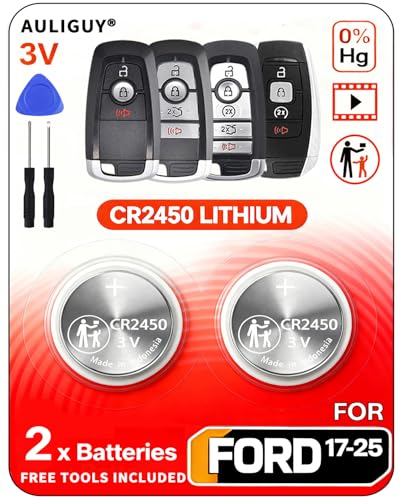
[Original OEM Battery as Provided by Manufacturer] - Our CR2450 batteries are sourced from the same trusted manufacturer used by Ford/Lincoln. Please refer to the fitment guide in the product images to check for compatibility.

**Please confirm compatibility using the fitment guide located in the product images** Not compatible with 2015-2024 trims that have push to start (you push a button to turn on the car rather than insert a key)

**Please confirm compatibility using the fitment guide located in the product images** This battery will not fit your fob unless it matches one of the examples provided.
Ford F-150 Key Fob Battery Installation Steps
Replacing the battery in your Ford F-150 key fob is a straightforward process that can save you time and money. This guide outlines the essential steps needed to ensure your key fob operates smoothly once again. Follow these simple instructions to get your key fob back in working order without any hassle.
Installing the new battery is straightforward. Ensure you place it correctly to avoid issues.
Take the new battery and align it with the positive side facing the correct direction.
Press the battery gently into place until it clicks.
Double-check the orientation to ensure it matches the old battery’s position.
Secure Ford F-150 Key Fob Case
Securing the case of your Ford F-150 key fob is a crucial step in ensuring its longevity and functionality. A properly sealed fob not only protects the internal components but also prevents accidental battery disconnection. Follow these straightforward instructions to effectively secure your key fob case after replacing the battery.
After replacing the battery, it’s time to close the fob. Follow these steps:
Align the two halves of the fob casing.
Press down firmly until you hear a click, indicating it is securely closed.
Inspect the fob for any gaps to ensure it is sealed properly.
Test Ford F-150 Key Fob After Battery Replacement
After replacing the battery in your Ford F-150 key fob, it’s essential to ensure that the fob is functioning correctly. Testing the key fob will confirm that the new battery is installed properly and that all features are operational. Follow these straightforward steps to verify that your key fob is ready for use.
After reassembling the fob, testing its functionality is crucial.
Press the lock and unlock buttons to ensure they respond.
Check the panic button to verify it works.
If the fob does not function, recheck the battery installation and ensure it is seated correctly.
Ford F-150 Key Fob Battery Replacement Issues
When dealing with a Ford F-150 key fob, battery replacement issues can arise, often leaving drivers frustrated and unable to access their vehicles. Understanding the common problems associated with key fob batteries is essential for a smooth replacement process. This section will address typical challenges and provide insights to ensure your key fob functions effectively after the battery change.
If you encounter problems after the battery replacement, consider these troubleshooting tips:
Dead battery: Ensure the new battery is not expired.
Improper installation: Verify that the battery is installed in the correct orientation.
Physical damage: Check for any cracks or damage to the fob casing.
When to Consult a Ford Key Fob Technician
While replacing the battery in your Ford F-150 key fob is often a straightforward task, certain situations may warrant professional assistance. If you encounter persistent issues with your key fob after a battery change or if the fob shows signs of physical damage, consulting a Ford key fob technician can ensure proper diagnosis and repair.
If the key fob still does not work after troubleshooting, it may be time to consult a professional.
A malfunctioning key fob may require reprogramming.
A damaged fob may need replacement.
Understanding these steps will help you confidently replace the battery in your Ford F-150 key fob.

Evan Armstrong is a lead automotive engineer at Car Troubleshooters with over 15 years of experience in the automotive industry. He has a Master's degree in Automotive Engineering and a deep understanding of how cars work and what it takes to fix them.