
Fixing the Service ESC warning on a GMC Sierra involves diagnosing the root cause and executing specific repairs. Common issues include faulty wheel speed sensors, wiring problems, or issues with the Electronic Stability Control module itself.
Electronic Stability Control System Insights
Understanding the Electronic Stability Control system is crucial for effectively diagnosing and repairing issues in your GMC Sierra. This advanced technology enhances vehicle stability by detecting and reducing loss of traction, making it essential for safe driving. Gaining insights into its components and functionality will empower you to tackle any related problems with confidence.
The Electronic Stability Control system enhances vehicle stability by detecting and reducing loss of traction. It uses various sensors to monitor the vehicle’s movements and applies brakes to individual wheels as needed.
When the Service ESC message appears, it indicates a malfunction within this system. Addressing this promptly can prevent further complications and ensure safe driving.
ESC Warning Indicators for GMC Sierra
Understanding the ESC warning indicators on your GMC Sierra is crucial for maintaining vehicle safety and performance. These alerts can signal issues with the electronic stability control system, which plays a vital role in preventing skidding and loss of control. Recognizing these indicators early can help you address problems before they escalate.
Identifying the symptoms of ESC problems is crucial for effective repairs. Here are common indicators that may accompany the Service ESC warning:
Warning lights on the dashboard
Reduced traction during acceleration
Unusual braking behavior
Increased wheel slip during turns
| Symptom | Primary Suspect | Difficulty (1-5) |
|---|---|---|
| Warning light illuminated | Faulty wheel speed sensor | 3 |
| Unstable driving | ESC module failure | 4 |
| Erratic braking | Wiring issues | 2 |
| Traction loss | Sensor misalignment | 3 |
Essential Tools for GMC Sierra Stability Repair
To effectively address issues with the Electronic Stability Control in a GMC Sierra, having the right tools is crucial. This section outlines the essential equipment needed for diagnosing and repairing stability control problems, ensuring you can tackle the task with confidence and precision. Equip yourself with these tools to streamline the repair process and enhance your vehicle’s performance.
Before starting repairs, ensure you have the right tools and supplies. This preparation will streamline the process and minimize delays. Here’s a checklist of what you need:
OBD-II scanner for diagnostics
Multimeter for electrical testing
Basic hand tools (wrenches, sockets)
Replacement sensors if needed
Electrical tape for wiring repairs
Safety Precautions for Vehicle Repairs
When addressing issues with the Electronic Stability Control in a GMC Sierra, safety should be your top priority. Understanding the necessary precautions can help prevent accidents and ensure a secure repair process. This section outlines essential safety measures to take before beginning any vehicle repairs.
Safety should always be a priority when working on vehicle systems. Before beginning repairs, take the following precautions:
Disconnect the battery to prevent electrical shorts.
Wear safety goggles to protect your eyes from debris.
Work in a well-ventilated area to avoid inhaling fumes.
GMC Sierra Electronic Stability Repair Steps
When facing issues with the Electronic Stability Control (ESC) in your GMC Sierra, understanding the repair process is crucial for restoring optimal vehicle performance. This section outlines the essential steps to diagnose and fix ESC problems, ensuring your truck operates safely and efficiently on the road. Follow these guidelines to effectively address any electronic stability concerns.
Follow these steps to effectively diagnose and repair the Service ESC issue on your GMC Sierra.
Connect the OBD-II scanner to the vehicle’s diagnostic port.
Read the error codes and note any related to the ESC system.
Inspect the wheel speed sensors for damage or dirt.
Test the sensors using a multimeter for proper resistance.
Check wiring for frays or corrosion.
Replace faulty components as necessary.
Clear the error codes and test drive the vehicle to ensure the issue is resolved.
Recommended Products
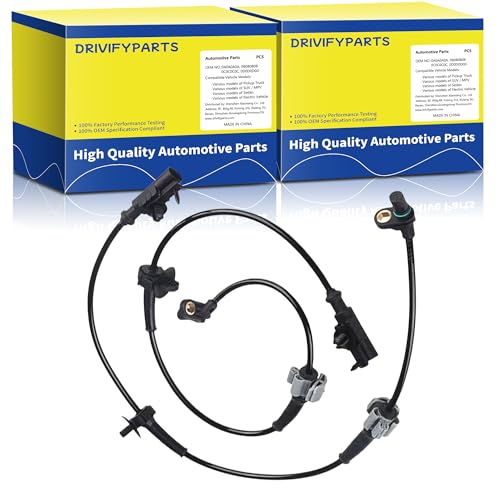
ABS wheel speed sensor fit for Chevrolet Models: 2007-2013 Silverado 1500, 2007-2014 Tahoe, 2007-2013 Avalanche, 2007-2014 Suburban 1500.

【Compatibility】: ABS Wheel Speed Sensor Compatible with 2002-2006 Avalanche 1500/2500, 2003-2013 Express 1500, 2003-2005 Express 2500, 1999-2006 Silverado 1500/2500, 2001-2006 Silverado 3500, 2007 Silverado 1500/2500/3500 Classic, 2000-2006 Suburban 1500/2500, 2000-2006 Tahoe, Compatible with GMC Models: 2003-2013 Savana 1500, 2003-2005 Savana 2500, 1999-2006 Sierra 1500/2500, 2001-2006 Sierra 3500, 2007 Sierra 1500/2500/3500 Classic, 2000-2006 Yukon, 2000-2006 Yukon Xl 1500/2500; Compatible with Other Models:, 2002-2006 Cadillac Escalade, 2003-2007 Hummer H2 Please check year, make, model, and OE number before purchase.
Wheel Speed Sensor Diagnostics for ESC Issues
When addressing Electronic Stability Control (ESC) issues in a GMC Sierra, diagnosing the wheel speed sensors is a critical step. These sensors play a vital role in monitoring vehicle stability and traction, and any malfunction can lead to significant performance problems. Understanding how to properly assess and troubleshoot these sensors is essential for effective repairs.
Wheel speed sensors are often the culprits behind ESC warnings. These sensors monitor the speed of each wheel and send data to the ESC module.
If they malfunction, the system cannot function correctly. Here’s how to troubleshoot:
Visually inspect each sensor for physical damage.
Use a multimeter to check for proper voltage output.
Clean the sensors to remove any debris that may interfere with readings.
Consulting a Certified Mechanic
If the issue persists after following the steps above, it may be time to consult a professional mechanic. Advanced diagnostics may be required to pinpoint the exact problem. A certified technician can provide a thorough inspection and repair any hidden issues.
Recommended Products
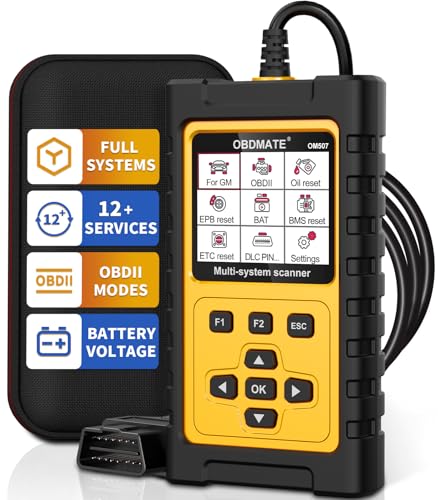
【OE-Level Scanner For GM】OBDMATE brand new OM507 car scanner is compatible with GMC vehicles 1996-2020 with OBDII protocols(12V, 16Pin DLC). This professional code reader performs deep diagnostics for the all GMC's vehicle systems (ABS/SRS/Engine/Transmission/...) beyond full basic OBD2 functions. It supports reading and erasing fault code, displaying graphic live data and reading VIN information.

【Professional Accessories】Our OBD1 scanner connector is a male-to-female extension cable specifically designed to connect the scanner and vehicle, a utility tool specifically designed for GM vehicles, but this item is just a cable, not a scanner or diagnostic tool.
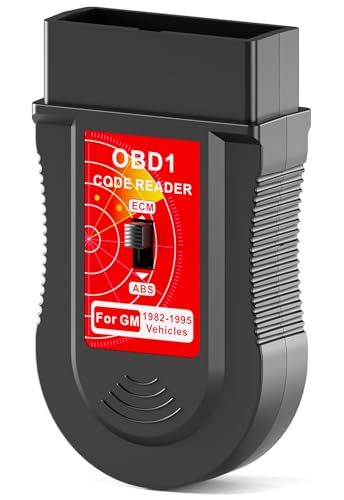
Safer Than A Paper Clip: Technically equivalent to a straightened clip in function, but skip the risky DIY jumper wire - a professional connector prevents short circuits. Lights will flash on the dashboard to help you make counts. And the book inside will help you to locate the problem
ESC Issue Resolution for GMC Sierra
Addressing the Electronic Stability Control (ESC) issues in a GMC Sierra is crucial for maintaining vehicle safety and performance. This section outlines common problems associated with the ESC system and provides step-by-step solutions to effectively diagnose and resolve these issues, ensuring your truck operates smoothly and safely on the road.
Neglecting ESC issues can lead to compromised vehicle safety and performance. Addressing these problems promptly is crucial for maintaining control and stability while driving.

Evan Armstrong is a lead automotive engineer at Car Troubleshooters with over 15 years of experience in the automotive industry. He has a Master's degree in Automotive Engineering and a deep understanding of how cars work and what it takes to fix them.