
Changing the battery in a Honda Pilot key fob is a straightforward process that can be completed in a few minutes. This guide outlines the steps required to replace the battery effectively, ensuring your key fob functions properly without the need for professional assistance.
Essential Tools for Key Fob Battery Change
To successfully change the battery in your Honda Pilot’s key fob, having the right tools is crucial. This section outlines the essential items you’ll need to ensure a smooth and efficient battery replacement process. With these tools in hand, you can tackle the task with confidence and ease.
Before starting the battery replacement, ensure you have the right tools and supplies on hand. This will make the process smoother and quicker. You will need:
New battery (CR2032 is common for Honda key fobs)
Small flathead screwdriver or plastic pry tool
Clean cloth for handling the components
Having these items ready will minimize interruptions during the replacement.
Battery Change Preparation Steps
Before diving into the battery replacement process for your Honda Pilot’s key fob, it’s essential to prepare adequately. Gathering the right tools and understanding the necessary steps will streamline the task, ensuring a smooth and efficient battery change. This preparation will help you avoid common pitfalls and make the DIY fix straightforward.
Preparation is key to a successful battery change. Follow these steps to ensure a safe and efficient process.
Find a well-lit area to work. This helps in seeing small components clearly.
Remove any accessories attached to your key fob. This prevents damage during the process.
Clean the key fob with a cloth to remove dirt or debris. This ensures a clean workspace.
Taking these preparatory steps will help avoid any complications during the battery replacement.
Accessing the Honda Pilot Key Fob Case
Accessing the key fob case of your Honda Pilot is the first step in changing its battery. This process requires careful handling to avoid damaging the fob. By following the right techniques, you can easily open the case and prepare for a seamless battery replacement.
Opening the key fob case requires careful handling to avoid damage. Follow these steps:
Locate the seam of the key fob where the two halves meet.
Insert the flathead screwdriver or plastic pry tool into the seam gently.
Twist the tool to pry the two halves apart. Be cautious not to apply too much force.
Once the fob is open, you will see the battery compartment.
Recommended Products
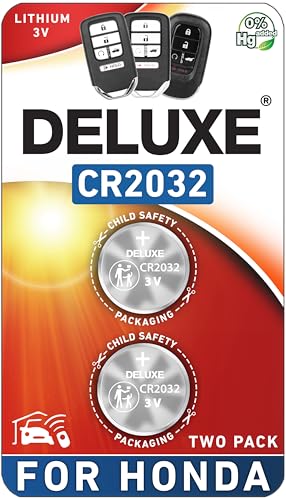
CONFIRM FIT - **Please confirm compatibility using the fitment guide located in the product images**

Perfect Fit for Honda Key Fobs - Designed to match a wide range of Honda models, including the Civic, Accord, CRV, Pilot, Odyssey, HRV, Fit, Passport, Ridgeline, Crosstour, Insight, Clarity, CR-Z this CR2032 battery set ensures a precise fit for your key fob. Say goodbye to compatibility worries and hello to a hassle-free solution.

PACKAGE INCLUDED : Two (2) CR2032 Remote key Fob Battery and Opening/Pry Tools , Five item bundle (total 5pcs) , Please confirm compatibility using the fitment guide located in the product images.
Old Key Fob Battery Removal Steps
Changing the battery in your Honda Pilot’s key fob can seem daunting, but with the right steps, it becomes a straightforward task. This section outlines the precise removal process for your old key fob battery, ensuring you can replace it efficiently and get back to using your vehicle without any hassle. Follow these easy steps to ensure a smooth battery change.
Removing the old battery is a critical step. Follow these instructions:
Identify the orientation of the battery. Note which side is positive and which is negative.
Gently lift the battery out of the compartment using your fingers or the screwdriver.
Dispose of the old battery properly. Many stores offer recycling options for batteries.
This step is essential to ensure the new battery is installed correctly.
Recommended Products

PACKAGE INCLUDED : Two (2) CR1616 Remote key Fob Batteries and Opening/Pry Tools , Five item bundle (total 5pcs) , Please confirm compatibility using the fitment guide located in the product images.

CONFIRM FIT **Please confirm compatibility using the fitment guide located in the product images** This battery will only fit your key fob if it exactly matches one of the examples in the compatibility guide.

Original OEM Battery as Provided by Manufacturer - Same batteries as provided by OEM original manufacturer in all (3 or 4 button) Head Key remote fobs.
Install the New Battery
Replacing the battery in your Honda Pilot key fob is a straightforward process that can save you time and money. This section will guide you through the steps to install the new battery, ensuring your key fob functions properly and efficiently. Follow these instructions carefully to complete the task with ease.
Installing the new battery is straightforward. Ensure you follow these steps carefully:
Insert the new battery into the compartment, matching the orientation you noted earlier.
Press down gently to secure the battery in place.
Check for a snug fit to ensure proper connection.
A well-installed battery will enhance the functionality of your key fob.
Key Fob Reassembly Steps
After successfully replacing the battery in your Honda Pilot’s key fob, it’s essential to reassemble it correctly to ensure it functions properly. This section will guide you through the necessary steps to put your key fob back together securely, so you can get back on the road without any issues. Follow these instructions carefully for a seamless reassembly process.
Reassembling the key fob is the final step in the process. Follow these guidelines:
Align the two halves of the key fob carefully.
Press the halves together until you hear a click, indicating they are securely closed.
Test the key fob to ensure it works properly.
Make sure the fob is fully assembled to prevent any issues later.
Key Fob Battery Replacement Issues
When replacing the battery in your Honda Pilot’s key fob, you may encounter several common issues that can complicate the process. Understanding these potential problems will help you troubleshoot effectively and ensure your key fob functions properly after the battery change. This section will address typical challenges and provide solutions to make your DIY fix smoother.
Sometimes, issues may arise even after replacing the battery. Here are some common problems and their solutions:
| Symptom | Primary Suspect | Difficulty (1-5) |
|---|---|---|
| Key fob not responding | Incorrect battery installation | 2 |
| Weak signal | Battery not fully charged | 3 |
| Buttons sticking | Dirt or debris inside | 2 |
Identifying these issues early can save time and frustration.
Maintain Your Key Fob
Maintaining your key fob is essential for ensuring its longevity and functionality. Regular battery checks and timely replacements can prevent unexpected lockouts and enhance the overall convenience of your Honda Pilot. This section will guide you through simple steps to keep your key fob in top condition.
Regular maintenance can prolong the life of your key fob. Consider these tips:
Keep the fob clean by wiping it down regularly.
Store it in a safe place to avoid damage.
Replace batteries every 2-3 years, even if not needed.
Implementing these practices will help maintain functionality and reliability.
Final Check on Key Fob Functionality
After replacing the battery in your Honda Pilot’s key fob, it’s essential to ensure everything is functioning correctly. A final check will confirm that the new battery is installed properly and that all features of the key fob are working as intended, providing you with peace of mind before hitting the road.
After completing the battery replacement, perform a final check to ensure everything is working correctly. Test all buttons and functions of the key fob. If any issues persist, revisit the installation steps or consult a professional.
This simple DIY fix can save time and money while ensuring your Honda Pilot key fob operates smoothly.

Evan Armstrong is a lead automotive engineer at Car Troubleshooters with over 15 years of experience in the automotive industry. He has a Master's degree in Automotive Engineering and a deep understanding of how cars work and what it takes to fix them.