
To fix the passenger door lock on a 2008 GMC Sierra, replacing the door lock actuator is often necessary. This component controls the locking mechanism and can fail due to wear or electrical issues.
2008 GMC Sierra Door Lock Actuator Diagnostics
Diagnosing issues with the door lock actuator in a 2008 GMC Sierra is essential for restoring functionality to the passenger door. This section will guide you through the necessary steps to identify problems with the actuator, ensuring a thorough understanding of its operation and potential failure points. Accurate diagnostics can save time and resources during the repair process.
| Symptom | Primary Suspect | Difficulty |
|---|---|---|
| Door lock does not respond | Faulty door lock actuator | 3 |
| Lock engages but does not hold | Wiring issues or actuator failure | 4 |
| Unusual noises when locking | Mechanical obstruction | 2 |
2008 GMC Sierra Door Lock Actuator Issues
The 2008 GMC Sierra is known for its durability, but issues with the door lock actuator can compromise its functionality. Symptoms such as unresponsive locks or inconsistent operation may indicate a failing actuator, requiring careful diagnosis and replacement to restore proper locking mechanisms. Understanding these common problems is essential for effective troubleshooting and repair.
The door lock actuator is responsible for locking and unlocking the passenger door. Over time, this component can wear out or become damaged due to exposure to moisture and dirt.
Symptoms of a failing actuator include the door lock not responding, making unusual noises, or only partially engaging. Identifying the root cause is essential before proceeding with the replacement.
2008 GMC Sierra Actuator Replacement Guide
If you’re experiencing issues with the passenger door lock on your 2008 GMC Sierra, replacing the actuator may be necessary. This guide provides a step-by-step approach to help you diagnose the problem and successfully replace the faulty actuator, ensuring your door locks function properly once again.
Replacing the door lock actuator involves several steps. Follow this guide to ensure a successful repair.
Gather Necessary Tools and Supplies
Socket set
Screwdrivers
Replacement door lock actuator
Electrical tape
Wire connectors
Prepare the Vehicle
Park the vehicle on a flat surface.
Disconnect the negative battery terminal to prevent electrical shorts.
Remove the Door Panel
Use a screwdriver to remove screws securing the door panel.
Carefully pry off the panel using a trim tool to avoid damaging clips.
Access the Actuator
Locate the door lock actuator within the door assembly.
Disconnect the wiring harness from the actuator.
Replace the Actuator
Remove the screws holding the actuator in place.
Install the new actuator and secure it with screws.
Reconnect the wiring harness.
Reassemble the Door Panel
Align the door panel and press it back into place.
Reinstall screws to secure the panel.
Reconnect the Battery
Reattach the negative battery terminal.
Test the door lock to ensure proper function.
Recommended Products

Compatibility: Front Right Passenger Side Door Lock Latch Actuator Motor compatible with 2007 2008 2009 2010 2011 2012 2013 2014 Chevy Suburban 1500 2500, Tahoe, 2007 2008 2009 Chevy Silverado 1500 2500 HD 3500 HD, Avalanche, 2006-2011 for Chevy Impala, 2007-2014 GMC Yukon XL 1500 2500, 2007-2009 GMC Sierra 1500 2500 HD 3500 HD, 2007-2014 Escalade ESV EXT

VEHICLE FITMENT - Located on the front right side of the door. The lock actuator compatible with Cadillac Escalade ESV 2007 2008 2009 2010 2011 2012 2013 2014 | Escalade EXT 2007-20013 | Chevrolet Silverado 1500 2500 HD 3500 HD 2007-2009 | Avalanche 2007-2009 | Suburban 1500 2007-2014 | Suburban 2500 2007-2013 | Tahoe 2007-2014 | GMC Sierra 1500 2500 HD 3500 HD 2007-2009 | Yukon/Yukon XL 1500 2007-2014 | Yukon XL 2500 2007-2013. Please Check Fitment and Part Number Before Buy.
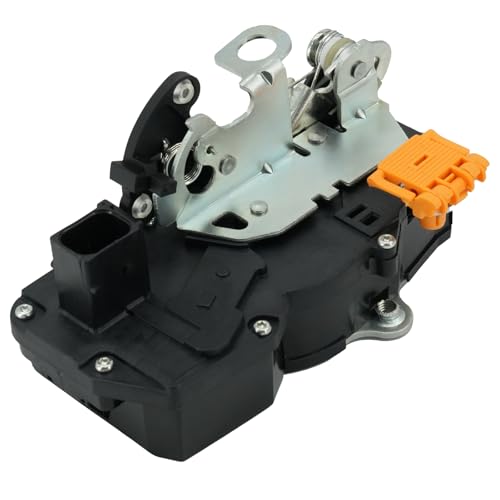
[Suitable] Rear passenger door latch is compatible with 2007 2008 2009 Chevy Tahoe/Avalanche/Silverado 1500/Silverado 2500 HD/Silverado 3500 HD/Suburban 1500/Suburban 2500, 2007 2008 2009 Cadillac Escalade/ Escalade ESV/ Escalade EXT, 2007 2008 2009 GMC Sierra 1500/Sierra 2500 HD/Sierra 3500 HD/Yukon/Yukon XL 1500/Yukon XL 2500.NOT compatible with the 2007 Silverado/Sierra Classic.
Post-Actuator Replacement Issues in 2008 GMC Sierra
After replacing the door lock actuator in a 2008 GMC Sierra, drivers may encounter several issues that can affect the functionality of the passenger door lock. Understanding these potential problems is essential for ensuring the lock operates smoothly and reliably. This section explores common post-replacement challenges and how to address them effectively.
After replacing the actuator, some issues may still arise. These can include:
Wiring Problems: Inspect the wiring harness for damage or corrosion.
Mechanical Obstructions: Ensure no debris is blocking the locking mechanism.
Incompatible Parts: Verify that the replacement actuator is compatible with the 2008 GMC Sierra.
2008 GMC Sierra Door Lock Repair Tools
To effectively repair the passenger door lock on a 2008 GMC Sierra, having the right tools is essential. This section outlines the specific tools needed for actuator replacement, ensuring a smooth and efficient repair process. With the proper equipment at hand, you can tackle the task with confidence and precision.
Before starting the repair, ensure you have the following tools and supplies ready:
| Tool/Supply | Purpose |
|---|---|
| Socket set | Remove screws and bolts |
| Screwdrivers | Access door panel and actuator |
| Replacement actuator | Replace faulty component |
| Electrical tape | Secure connections |
| Wire connectors | Repair any damaged wiring |
GMC Sierra 2008 Repair Safety Guidelines
When replacing the actuator in a 2008 GMC Sierra’s passenger door lock, adhering to safety guidelines is crucial. Proper precautions help prevent accidents and ensure a smooth repair process. This section outlines essential safety measures to follow during the actuator replacement to protect both the vehicle and the technician.
When working on the vehicle, always prioritize safety. Follow these precautions:
Wear safety glasses to protect your eyes.
Use gloves to avoid cuts and scrapes.
Ensure the vehicle is stable and will not roll during repair.
Post-Repair Checks for GMC Sierra Door Lock
After replacing the actuator in the passenger door lock of a 2008 GMC Sierra, it’s crucial to conduct thorough post-repair checks. These evaluations ensure that the new component functions correctly and that the door operates smoothly. Addressing any issues at this stage can prevent future problems and enhance the overall reliability of the vehicle’s locking system.
After completing the actuator replacement, perform these checks:
Verify that the door locks and unlocks smoothly.
Check for any unusual sounds during operation.
Ensure that all electrical connections are secure.
This process can restore functionality to the passenger door lock and improve overall security.

Evan Armstrong is a lead automotive engineer at Car Troubleshooters with over 15 years of experience in the automotive industry. He has a Master's degree in Automotive Engineering and a deep understanding of how cars work and what it takes to fix them.