
Resetting the radio in a 2019 Jeep Cherokee can resolve connection issues and restore functionality. This process typically involves a series of straightforward steps that can be performed by most vehicle owners without specialized tools.
2019 Jeep Cherokee Radio Connection Troubleshooting
If you’re experiencing issues with the radio connection in your 2019 Jeep Cherokee, troubleshooting can help restore functionality. This section provides step-by-step guidance to identify and resolve common problems, ensuring you can enjoy your audio experience without interruptions. Follow these tips to get your radio back in working order efficiently.
Radio connection problems in the 2019 Jeep Cherokee can stem from various sources. Common symptoms include static noise, failure to connect to Bluetooth, or the radio not responding to commands. Identifying the root cause is essential for effective troubleshooting.
Jeep Cherokee Radio Malfunction Symptoms
Understanding the symptoms of a malfunctioning radio in a 2019 Jeep Cherokee is crucial for effective troubleshooting. Common issues can range from audio distortion to complete system failure, impacting your driving experience. Identifying these signs early can help you address the problem before it escalates.
Recognizing the symptoms of radio issues can help in diagnosing the problem. Here are some frequent signs:
Static Noise: Interference during radio operation.
Bluetooth Connectivity Issues: Inability to pair with devices.
Unresponsive Controls: Touchscreen or buttons not functioning.
No Sound: Complete absence of audio output.
| Symptom | Primary Suspect | Difficulty (1-5) |
|---|---|---|
| Static Noise | Antenna Issue | 2 |
| Bluetooth Problems | Software Glitch | 3 |
| Unresponsive Controls | Wiring Issue | 4 |
| No Sound | Amplifier Failure | 5 |
Jeep Cherokee 2019 Radio Reset Instructions
If you’re experiencing issues with the radio in your 2019 Jeep Cherokee, a reset may be necessary to restore functionality. This section provides clear, step-by-step instructions to help you reset your radio and troubleshoot common connection problems, ensuring you can enjoy your audio experience once again. Follow these guidelines to get your radio back on track.
Resetting the radio can often resolve minor software glitches. Follow these steps to perform a reset on your Jeep Cherokee’s radio system:
Turn Off the Vehicle: Ensure the ignition is completely off.
Disconnect the Battery: Remove the negative terminal from the battery for at least 10 minutes.
Reconnect the Battery: Reattach the negative terminal securely.
Start the Vehicle: Turn on the ignition and check the radio functionality.
Jeep Cherokee Radio Connection Solutions
If you’re experiencing connectivity issues with your 2019 Jeep Cherokee radio, you’re not alone. Many owners face similar challenges, but fortunately, there are effective troubleshooting steps you can take to reset the system and restore functionality. This guide will walk you through the necessary solutions to get your radio back in working order.
If the reset does not resolve the issue, consider these additional troubleshooting methods:
Check Antenna Connection: Ensure the antenna is securely connected to the radio unit.
Inspect Wiring Harness: Look for any visible damage or loose connections in the wiring.
Update Software: Ensure the radio software is up to date. This can often be done through the vehicle’s settings menu.
Essential Tools for Jeep Cherokee Radio Reset
To successfully reset the radio in a 2019 Jeep Cherokee, having the right tools on hand is crucial. This section outlines the essential equipment needed to facilitate a smooth reset process, ensuring you can tackle any connection issues effectively and efficiently. Being prepared will help you navigate potential challenges with ease.
Before starting the reset process, gather the necessary tools and supplies. Having these items on hand will streamline the troubleshooting process.
Wrench or Socket Set: For battery terminal removal.
Multimeter: To check voltage and continuity in wiring.
Owner’s Manual: For reference on radio specifications and settings.
Flash Drive: For software updates if needed.
Jeep Cherokee Radio Reset Safety Tips
Resetting the radio in your 2019 Jeep Cherokee can enhance your driving experience, but it’s essential to prioritize safety during the process. Understanding the potential risks and taking necessary precautions will help you avoid complications and ensure a smooth reset. This section outlines key safety tips to keep in mind while troubleshooting your vehicle’s radio connection.
Safety is paramount when working on vehicle electronics. Always follow these precautions:
Wear Safety Gear: Use gloves and eye protection.
Work in a Well-Ventilated Area: Avoid fumes from the battery.
Ensure Vehicle is Off: Prevent accidental activation of systems.
Jeep Cherokee 2019 Radio Reset Steps
Resetting the radio in your 2019 Jeep Cherokee can resolve various connectivity issues and improve overall performance. This guide outlines the specific steps needed to effectively reset your vehicle’s radio system, ensuring you can enjoy your favorite music and navigation features without interruption. Follow these instructions carefully to restore optimal functionality.
Executing the reset correctly is crucial for restoring radio functionality. Follow these detailed steps to ensure success:
Prepare the Vehicle: Park in a safe location and turn off all electronics.
Disconnect Battery: Use the wrench to loosen the negative terminal. Remove it carefully.
Wait: Allow at least 10 minutes for the system to reset completely.
Reconnect Battery: Securely attach the negative terminal and ensure a tight fit.
Test Radio: Start the vehicle and check if the radio operates normally.
Recommended Products

【Specific Compatibility】The Brass Extreme Duty Battery Terminal Kit is designed for Jeep Wrangler JL and Gladiator JT 2018 2019 2020 2021 2022 2023 2024 2025.

【Fitment】Fits for 2018-2025 Jeep Wrangler JL Gladiator JT.
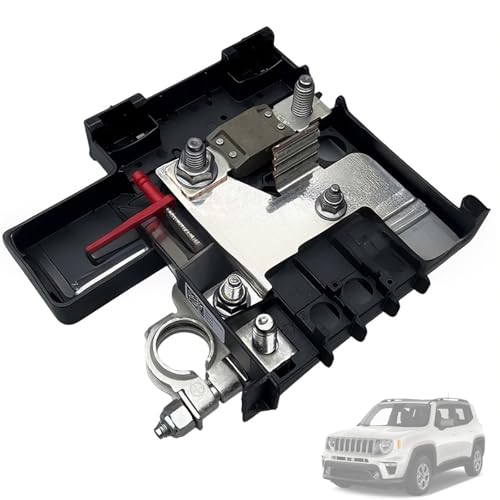
Compatible With: This battery control unit fits Jeep Renegade 2015–2020 and Fiat 500X 2016–2018, restoring proper battery stabilization, voltage regulation, and electrical system monitoring.
Further Troubleshooting for Jeep Cherokee Radio
If you’re still experiencing issues with your 2019 Jeep Cherokee radio after attempting a reset, further troubleshooting may be necessary. This section outlines additional steps to diagnose and resolve persistent connection problems, ensuring your audio system functions as intended. Follow these guidelines to get your radio back in optimal working condition.
If issues persist after the reset, further investigation may be required. Consider these final steps:
Visit a Professional: If problems continue, consult a certified technician.
Check for Recalls: Verify if there are any recalls related to the radio system.
Consider Replacement: If the radio is beyond repair, replacement may be necessary.
Jeep Cherokee Radio Resetting Steps
Resetting the radio in your 2019 Jeep Cherokee can resolve various connection issues and improve overall functionality. This section outlines the precise steps needed to perform a reset, ensuring your audio system operates smoothly and efficiently. Follow these instructions carefully to troubleshoot and restore your radio’s performance.
Take the time to follow the outlined steps carefully. A successful reset can restore your radio’s functionality and enhance your driving experience. If problems persist, do not hesitate to seek professional assistance.

Evan Armstrong is a lead automotive engineer at Car Troubleshooters with over 15 years of experience in the automotive industry. He has a Master's degree in Automotive Engineering and a deep understanding of how cars work and what it takes to fix them.