
Resetting the computer on a GMC truck is essential for clearing all fault codes and restoring optimal performance. This process can be accomplished using an OBD-II scanner or by disconnecting the battery. Follow the detailed steps below to ensure a proper reset.
GMC Truck Computer Reset Procedures
Resetting the computer on a GMC truck can help clear fault codes and restore optimal performance. Understanding the specific procedures for your model is essential to ensure a successful reset. This section outlines the necessary steps to effectively reset the computer and address any lingering issues.
The computer system in a GMC truck manages various functions, including engine performance and emissions control. Fault codes can accumulate due to sensor malfunctions or other issues. Clearing these codes is necessary for troubleshooting and maintaining vehicle performance.
Recommended Products

CEL Doctor: The ANCEL AD310 is one of the best-selling OBD II scanners on the market and is recommended by Scotty Kilmer, a YouTuber and auto mechanic. It can easily determine the cause of the check engine light coming on. After repairing the vehicle's problems, it can quickly read and clear diagnostic trouble codes of emission system, read live data & hard memory data, view freeze frame, I/M monitor readiness and collect vehicle information.

【A MUST-HAVE TOOL FOR DIYERS】 - VDIAGTOOL VD10 car code reader is an incredibly useful obd scanner for each car owner or hobbyist, even for those with little to no experience when it comes to vehicle mechanics! Similar to a fixd car diagnostic tool, using this car diagnostic scanner is extremely easy. All you have to do is attach it to your car OBDII port and you can diagnose car problems in seconds! Read Codes (DTCs); Clear Codes; Live Data; View Freeze Frame; I/M Readiness; Vehicle Information.

WIDE COMPATIBILITY – Trusted by YouTube Star Scotty Kilmer. The AD410 OBD2 Scanner supports all 16PIN vehicles that comply with the OBDII protocol, including KWP2000, ISO9141, J1850 VPW, J1850 PWM, and CAN. This OBD2 code scanner compatible with 1996 US-based, 2000 EU-based and Asian cars, light trucks, SUVs, as well as newer OBD2 and CAN vehicles. Multilingual support (English, German, French, Spanish, etc.), this car code reader is ideal for international users. Check compatibility with your vehicle model before purchasing. !!! Powered directly from your vehicle's OBDII connector, this diagnostic tool doesn' t need a battery or charger.
Common Symptoms Indicating a Reset is Needed
When your GMC truck displays unusual behavior or warning lights, it may be time to consider a computer reset. Recognizing common symptoms can help you determine if a reset is necessary to clear faults and restore optimal performance. Understanding these signs is crucial for maintaining your vehicle’s reliability and functionality.
Recognizing when to reset the computer can save time and prevent unnecessary repairs. Common symptoms include:
Check Engine Light illumination
Erratic engine performance
Poor fuel economy
Transmission shifting issues
| Symptom | Primary Suspect | Difficulty (1-5) |
|---|---|---|
| Check Engine Light | Faulty sensor | 2 |
| Poor fuel economy | Engine misfire | 3 |
| Erratic performance | Electrical issue | 4 |
| Transmission issues | TCM fault | 5 |
Preparing for the Reset Process
Before resetting the computer on your GMC truck, it’s essential to prepare adequately to ensure a smooth process. This involves gathering the necessary tools, understanding the specific steps required, and being aware of any potential issues that may arise. Proper preparation can help you clear all faults effectively and restore your vehicle’s performance.
Preparation is key to a successful reset. Gather the necessary tools and ensure safety measures are in place.
Essential Tools for GMC Computer Reset
To effectively reset the computer on a GMC truck, having the right tools is crucial. These tools not only facilitate the process but also ensure that all fault codes are cleared properly. Understanding which equipment you’ll need can make the reset smoother and more efficient.
You will need the following items to reset the computer:
OBD-II scanner
Wrench or socket set
Safety gloves
Safety glasses
GMC Truck Safety Guidelines for Resets
When resetting the computer on your GMC truck, it’s essential to follow specific safety guidelines to ensure both your vehicle’s functionality and your personal safety. These precautions help prevent accidental damage and ensure that the reset process is carried out smoothly, allowing you to clear any fault codes effectively. Familiarizing yourself with these guidelines can make the process more efficient and safe.
Always prioritize safety when working on your GMC truck.
Disconnect the battery before starting any electrical work.
Wear safety gloves to protect your hands.
Use safety glasses to shield your eyes from debris.
GMC Truck Computer Reset Procedure
Resetting the computer on a GMC truck is essential for clearing fault codes and restoring optimal performance. This process can help address various issues, from check engine lights to performance glitches. Understanding the correct procedure ensures that you can effectively reset the system and maintain your vehicle’s reliability.
Follow these steps to reset the computer on your GMC truck effectively.
Recommended Products

【Vehicle CEL Doctor】The NT301 obd2 scanner enables you to read DTCs, access to e-missions readiness status, turn off CEL(check engine light) or MIL, reset monitor, read live data and retrieve VIN of your vehicle. The fault code will appear again even though you cleared before, if you don't repair the car completely. The fault code only can be cleared by NT301 after car repair finished, as like all the obd2 scanner's working principle.
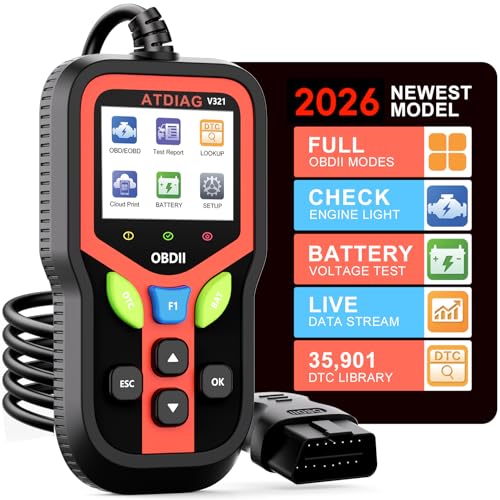
Professional OBD2 Scanner:Accurately diagnose why your check engine light is on. Read and clear trouble codes,check I/M readiness status, view real-time sensor data (like RPM, coolant temp, and fuel pressure), run EVAP tests, check battery health, and access freeze frame data. V321 scanner for car with a built-in library decoding over 35,901 fault codes, far more than basic scanners, you get deeper insight into your vehicle’s health.

Multi-Functions - Practical Multi-Functions OBD2 code reader features built-in OBD2 DTC lookup library, which help you to determine the cause of the engine light, read code, erase code, view freeze frame, I/M ready, vehicle information, data flow, real-time curve, get vehicle speed information, calculate load value, engine coolant temperature, get engine speed.
OBD-II Scanner Resetting Process
Resetting the computer on a GMC truck is essential for clearing fault codes and ensuring optimal performance. The OBD-II scanner plays a crucial role in this process, allowing you to access and reset the vehicle’s diagnostic information effectively. Understanding how to use this tool can help maintain your truck’s reliability and longevity.
An OBD-II scanner is the most efficient method for resetting the computer.
Locate the OBD-II port under the dashboard near the steering column.
Connect the OBD-II scanner to the port.
Turn on the ignition without starting the engine.
Select the “Erase Codes” option on the scanner.
Confirm the reset and wait for the process to complete.
Battery Disconnection for Computer Reset
Resetting the computer on a GMC truck can often be achieved through a straightforward method: disconnecting the battery. This process helps clear all fault codes and resets the system, allowing for a fresh start. Understanding the steps involved is essential for effective troubleshooting and maintenance.
If you do not have an OBD-II scanner, disconnecting the battery is an alternative method.
Open the hood and locate the battery.
Use a wrench to disconnect the negative terminal.
Wait for at least 15 minutes to allow the computer to reset.
Reconnect the negative terminal and tighten it securely.
Start the engine to check if the Check Engine Light is off.
Troubleshooting After the Reset
After resetting the computer on your GMC truck, it’s essential to troubleshoot any lingering issues that may arise. This process helps ensure that all systems are functioning correctly and that any fault codes are effectively cleared. Understanding how to address potential problems will enhance your vehicle’s performance and reliability.
After resetting the computer, monitor your GMC truck for any recurring issues.
Recommended Products

[Easy to Use—Work Out of the Box] + [FOXWELL 2026 New Version] FOXWELL NT604 Elite scan tool is the 2026 new version from FOXWELL, designed for car owners who want to figure out the cause of issues before fixing car problems by scanning common systems like ABS, SRS, engine, and transmission. The NT604 Elite obd2 scanner diagnostic tool comes with the latest software, ready to use out of the box—no need to waste time downloading software first.

[ Wide Vehicle Compatibility ] This OBD2 diagnostic scanner works for all vehicles after 1996 (US-based) / 2002 (EU-based) / 2008 (Asia-based) that have a standard 16PIN OBD2 port. Supports all OBDII protocols including KWP2000, ISO9141, J1850 VPW, J1850 PWM, and CAN. If your car has a check engine light and an OBD2 port, this car code reader is designed to work. Please confirm vehicle compatibility before purchase. ZM201 OBD2 scanner diagnostic tool powered directly from the OBDII port — no battery or charging required.
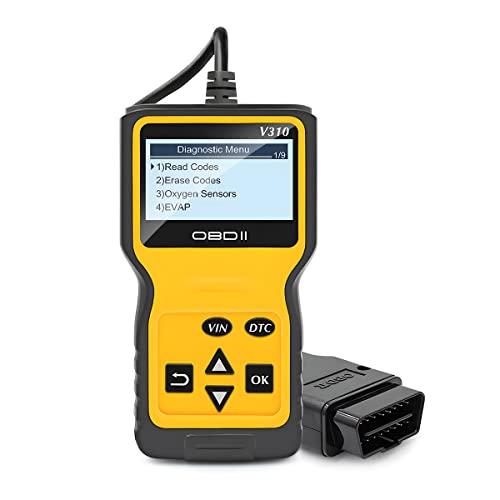
New Advantages: The OBD2 scanner can fully diagnose the car's data. It can determine the cause of the engine light, read code, erase code, view freeze frame, I/M ready, vehicle information, data flow, real-time curve, get vehicle speed information, calculate load value, engine coolant temperature, get engine speed. Six popular languages are supported: English, German, Dutch, Spanish, French, and Italian.
Post-Reset Warning Light Verification
After resetting the computer in your GMC truck, it’s essential to verify that all warning lights are functioning correctly. This step ensures that any faults have been cleared and that the vehicle is operating as intended. Proper verification can help prevent potential issues from being overlooked and maintain the truck’s performance.
Ensure that all warning lights are off.
Check engine performance during a test drive.
Verify that no new fault codes appear after a few days.
Troubleshooting Persistent GMC Computer Issues
Persistent computer issues in GMC trucks can be frustrating, especially when error codes linger despite repairs. Understanding how to troubleshoot these problems is essential for maintaining your vehicle’s performance and reliability. This section will guide you through the steps to effectively reset the computer and clear any faults that may be affecting your truck.
If issues persist after the reset, it may indicate a deeper problem.
Consider consulting a certified mechanic for diagnostics.
Avoid ignoring persistent warning lights as they can lead to further damage.
Successful Reset Confirmation Process
After completing the reset process on your GMC truck, it’s crucial to confirm that the computer has successfully cleared all faults. This step ensures that any lingering issues are addressed and that the vehicle’s systems are functioning optimally. Understanding how to verify this confirmation can help maintain your truck’s performance and reliability.
Confirm that the reset was successful by checking the following:
No warning lights are illuminated.
Engine runs smoothly without stalling or hesitation.
Fuel efficiency returns to expected levels.
By following these steps, you can effectively reset the computer on your GMC truck and clear all fault codes. This process helps maintain optimal vehicle performance and prevents unnecessary repairs.

Evan Armstrong is a lead automotive engineer at Car Troubleshooters with over 15 years of experience in the automotive industry. He has a Master's degree in Automotive Engineering and a deep understanding of how cars work and what it takes to fix them.