
Resetting the Nissan Frontier key fob is a straightforward process that can be accomplished in a few simple steps. This guide provides essential tips and techniques to quickly reset and sync your key fob, ensuring your vehicle remains accessible and secure.
Essential Items for Key Fob Reset
Before attempting to reset your Nissan Frontier key fob, it’s important to gather the necessary items that will facilitate the process. Having the right tools and components on hand can save you time and ensure a smooth reset experience. This section outlines the essential items you’ll need to successfully reset and sync your key fob.
Before beginning the reset process, ensure you have the following items ready:
Nissan Frontier key fob
Vehicle owner’s manual
Working key fob battery (if needed)
Having these supplies on hand will streamline the reset process and help avoid unnecessary delays.
Recommended Products

**Please confirm compatibility using the fitment guide located in the product images** This battery will not fit unless your key fob matches one of the examples provided.
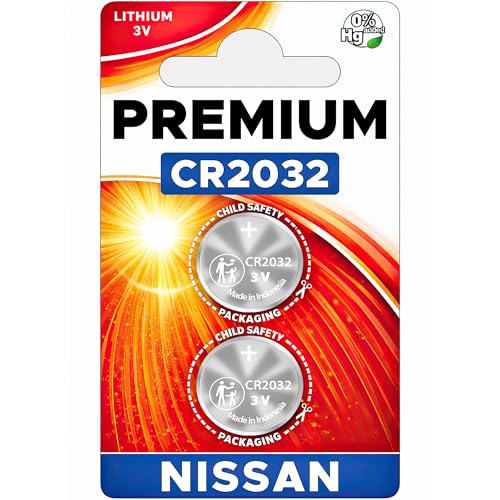
Key Fob Battery Replacement is compatible with Nissan smart key fobs; models: Rogue, Altima, Sentra, Versa, Pathfinder, Murano, Rogue Sport, Maxima, Kicks, Titan, Frontier, Armada, Leaf, Juke, Quest, Titan XD, Rogue Select, 370Z, GT-R, 400Z, Ariya, and Z, and Infiniti.

Battery for Nissan Key Fob: Includes [2] CR2032 batteries compatible with various Nissan key fob models like the 2022 Nissan Altima key fob battery, 2019 Nissan Sentra key fob battery, and 2021 Nissan Rogue fob battery.
Key Fob Reset Preparation Guidelines
Before diving into the process of resetting your Nissan Frontier key fob, it’s essential to gather the necessary tools and information. Proper preparation ensures a smoother experience and minimizes potential complications. Understanding these guidelines will set the stage for an effective reset and synchronization of your key fob.
Taking the right precautions can prevent potential issues during the reset. Follow these preparation steps:
Park the vehicle in a safe, well-lit area.
Close all doors to avoid accidental locking or unlocking.
Ensure the battery in your key fob is functional. A weak battery can hinder the reset process.
Following these steps will enhance your safety and ensure a smoother experience.
Step-by-Step Key Fob Reset Process
Resetting your Nissan Frontier key fob can seem daunting, but following a straightforward step-by-step process makes it manageable. This guide will walk you through each stage, ensuring your key fob is quickly reset and synchronized with your vehicle for optimal performance. Whether you’re facing issues with the fob or simply need to refresh its settings, these tips will help you regain control.
Resetting the key fob for the Nissan Frontier involves a few specific actions. Follow these steps carefully:
Enter the vehicle and close all doors.
Insert the key into the ignition and turn it to the “On” position without starting the engine.
Press the key fob buttons in sequence:
Press the Lock button once.
Press the Unlock button three times.
Turn the ignition off and remove the key.
Test the key fob functions to ensure they are working properly.
This method should successfully reset your key fob. If issues persist, further troubleshooting may be necessary.
Recommended Products

HIGH-QUALITY: Every Single Keyless Entry Remote Control Car Key Fob is Fully Pre-tested by Professional Locksmith Tools before Shipping. All Our Key Fobs are Pre-installed with Battery and Electronics.

【REFERENCE NUMBER】- FCC ID: KBRASTU15, CWTWB1U415, CWTWB1U733, CWTWB1U821. Designed with the same materials and components as the original part

fits Nissan Frontier Armada Murano Pathfinder Quest Sentra Titan Versa Xterra / Infiniti QX4 FX35 FX45
Key Fob Resetting Challenges and Solutions
Resetting the key fob for your Nissan Frontier can sometimes present challenges, especially if you’re unfamiliar with the process. This section addresses common issues that owners face during the reset and sync procedures, offering practical solutions to ensure your key fob functions smoothly and reliably. Understanding these challenges will help you navigate the reset process with confidence.
Sometimes, even after following the reset process, the key fob may not function correctly. Here are common issues and their solutions:
Key fob not responding
Replace the key fob battery.
Recheck the reset steps for accuracy.
Remote start not working
Ensure the vehicle is in the correct mode for remote start.
Check for any obstructions that may interfere with the signal.
Key fob loses sync
Repeat the reset process as outlined above.
Consider consulting a professional technician if problems continue.
Key Fob Battery Lifespan Insights
Understanding the lifespan of your Nissan Frontier key fob battery is essential for maintaining its functionality. Regularly monitoring battery health can prevent unexpected failures and ensure seamless access to your vehicle. This section provides insights into typical battery life and tips for recognizing when it’s time for a replacement.
The lifespan of a key fob battery can vary based on usage. Here are some key points to consider:
Average battery life is typically 2-3 years.
Signs of a weak battery include a delayed response or the need to be closer to the vehicle.
Replacing the battery is simple and can often be done without special tools.
| Key Fob Battery Type | Average Lifespan | Replacement Cost |
|---|---|---|
| CR2032 | 2-3 years | $5-$10 |
| CR2025 | 2-3 years | $5-$10 |
Understanding battery life helps maintain the functionality of your key fob.
Syncing Multiple Nissan Frontier Key Fobs
Syncing multiple key fobs for your Nissan Frontier can enhance convenience, especially for families or shared vehicles. This process ensures that each fob operates seamlessly with your truck, allowing multiple drivers to access the vehicle without hassle. Follow these steps to synchronize additional key fobs efficiently and effectively.
If you have multiple key fobs for your Nissan Frontier, syncing them is essential for optimal performance. Follow these steps:
Complete the reset process for the first key fob.
Repeat the reset steps for each additional key fob.
Test each key fob to ensure they all work correctly.
This ensures all key fobs are synchronized and functional.
Key Fob Malfunction Solutions and Support
Key fob issues can be frustrating, especially when they prevent your Nissan Frontier from starting or locking. Understanding the common malfunctions and their solutions is essential for any owner. This section provides practical tips and support to help you troubleshoot and resolve key fob problems effectively.
If your key fob continues to malfunction after following these steps, consult a Nissan dealership or a certified locksmith for further assistance. They can provide specialized support that may be necessary for more complex issues.

Evan Armstrong is a lead automotive engineer at Car Troubleshooters with over 15 years of experience in the automotive industry. He has a Master's degree in Automotive Engineering and a deep understanding of how cars work and what it takes to fix them.