
To open a Mazda 3 key fob for battery replacement, you need to locate the small notch on the side. Use a flathead screwdriver or a similar tool to gently pry the fob apart, allowing access to the battery compartment.
Essential Tools for Mazda 3 Key Fob Battery Swap
Before starting the process, ensure you have the right tools on hand. A flathead screwdriver or a plastic prying tool is essential to avoid damaging the key fob. Additionally, you will need a replacement battery, typically a CR2025 or CR2032, depending on your specific key fob model. Here’s a quick checklist:
| Tool | Purpose |
|---|---|
| Flathead screwdriver | Pry open the fob |
| Plastic prying tool | Prevent damage |
| Replacement battery | Power the fob |
Recommended Products

3V LITHIUM COIN BATTERIES: One 2 pack of Energizer 2025 Batteries

COMPATIBLE WITH AIRTAG & KEY FOBS: Works with Apple AirTag, all major car key fobs (Toyota, Honda, BMW, Ford, Chevrolet, Lexus), fitness trackers, glucose monitors, tire pressure sensors, and any CR2032 / 3V lithium coin battery device.
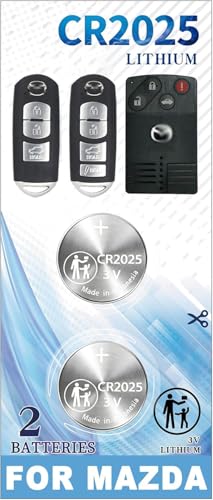
[Please check the second product image to confirm compatibility]- Installation Videos + Tools Included
Mazda 3 Key Fob Battery Replacement Prep
Preparation is key to a successful battery replacement. Make sure you are working in a well-lit area to clearly see the key fob components. It’s advisable to have a small container to hold screws and parts to prevent losing them during the process. Always ensure that you are grounded to avoid static electricity damaging the internal components.
Mazda 3 Key Fob Opening Safety Tips
When replacing the battery in your Mazda 3 key fob, it’s essential to prioritize safety to avoid damaging the device or injuring yourself. Understanding the proper techniques and precautions can make the process smoother and more efficient. This section outlines key safety tips to ensure a successful battery replacement.
While this task is straightforward, a few safety precautions can help. Avoid using excessive force when prying the fob open. If the fob is particularly stubborn, double-check for any hidden screws or clips that may be securing it.
Mazda 3 Key Fob Battery Replacement Steps
Replacing the battery in your Mazda 3 key fob is a straightforward process that can save you time and money. This guide will walk you through each step, ensuring you can easily access the battery and replace it without any hassle. Follow these simple instructions to keep your key fob functioning smoothly.
Follow these steps to replace the battery in your Mazda 3 key fob effectively.
Locate the notch on the side of the key fob.
Insert the flathead screwdriver or plastic prying tool into the notch.
Gently twist the tool to pry the fob apart.
Remove the old battery from its compartment.
Insert the new battery, ensuring the positive side is facing up.
Align the two halves of the fob and press them back together until they click securely.
Recommended Products

LONG LASTING PERFORMANCE: Panasonic CR2025 3.V batteries are engineered to provide reliable, long-lasting power

Long-Lasting Power – Our high-density batteries offer 10% higher energy density, ensuring superior performance.XUNIUZERO Coin CR2025 3V batteries have a non-toxic, bitter coating applied on both sides, to help discourage swallowing.

**To confirm compatibility please use the picture guide located in the product images**
Mazda 3 Key Fob Battery Replacement Issues
If your Mazda 3 key fob is unresponsive or has a weak signal, it may be time to replace the battery. Understanding common issues related to key fob battery replacement can help you troubleshoot effectively. This guide will walk you through the typical problems and solutions associated with your Mazda 3 key fob.
Sometimes, issues may arise during the battery replacement process. Here are some common problems and their solutions:
| Issue | Solution |
|---|---|
| Fob does not open | Check for hidden screws |
| Battery not fitting | Ensure correct battery type |
| Fob not working after replacement | Recheck battery orientation |
Mazda 3 Key Fob Malfunction Solutions
If your Mazda 3 key fob is not functioning properly, it may be time to troubleshoot the issue. Common problems can often be resolved with simple solutions, such as replacing the battery or reprogramming the fob. This section will guide you through effective methods to address and fix key fob malfunctions.
If your key fob still does not work after replacing the battery, there may be additional issues to consider.
Check the battery orientation to confirm it is installed correctly.
Inspect the fob for damage to the internal components.
Reprogram the fob if necessary, as some models require reprogramming after a battery change.
Recommended Products

KEY FOB BATTERY INSTALL - This kit includes [qty 2] CR2032 coin battery and video guide for effortless installation for Mazda key fobs

Elite USA Batteries Replacement are compatible with Mazda smart key fobs; models (has buttons on the side of the fob): for CX-5, CX-30, Mazda3, CX-9, Mazda6, CX-50, CX-90, CX-3, MX-5 Miata, CX-70, MX-30 EV. Also compatible with 2001-2011 Mazda Tribute, 1999-2009 Mazda B-Series Truck, and 1998-2002 Mazda 626.

**Please confirm compatibility using the fitment guide located in the product images**(Refer to the first picture of the product description to confirm the shape of the key)
Mazda 3 Key Fob Reprogramming Steps
Reprogramming your Mazda 3 key fob is a straightforward process that can save you time and money. Whether you’ve replaced the battery or need to sync a new fob, following these steps will ensure your key fob functions properly. This guide will walk you through the necessary actions to successfully reprogram your key fob with ease.
If your key fob is unresponsive post-battery replacement, reprogramming may be required. Here’s a simple guide:
Enter the vehicle and close all doors.
Insert the key into the ignition and turn it to the “On” position without starting the engine.
Press the lock button on the key fob within 10 seconds.
Turn the ignition off and remove the key.
This process may vary slightly depending on the year and model of your Mazda 3. Always refer to your owner’s manual for specific instructions.
Testing Mazda 3 Key Fob After Battery Change
After replacing the battery in your Mazda 3 key fob, it’s essential to ensure that the new battery is functioning correctly. Testing the key fob will help confirm that it communicates effectively with your vehicle and that you can confidently use it without issues. This section outlines simple steps to verify your key fob’s performance post-battery replacement.
After completing the battery replacement and any necessary reprogramming, test the fob to ensure it functions correctly. Check all buttons, including lock, unlock, and panic functions. If all buttons respond, your key fob is ready for use.
If problems persist, consider consulting a professional locksmith or your local dealership for further assistance.

Evan Armstrong is a lead automotive engineer at Car Troubleshooters with over 15 years of experience in the automotive industry. He has a Master's degree in Automotive Engineering and a deep understanding of how cars work and what it takes to fix them.