
Resetting a Ford Expedition key fob is a straightforward process that can be completed in a few simple steps. This guide will explain how to quickly reset and sync your key fob to ensure it functions properly.
Gather Necessary Tools for Key Fob Reset
Before diving into the process of resetting your Ford Expedition key fob, it’s essential to gather the necessary tools. Having the right items on hand will streamline the reset and sync process, ensuring you can efficiently restore functionality to your key fob without unnecessary delays. This preparation sets the stage for a smooth and effective reset experience.
Before starting the reset process, ensure you have the following tools ready. Having these items on hand will streamline the procedure and minimize interruptions.
New batteries for the key fob
Flathead screwdriver for opening the key fob
Owner’s manual for specific instructions
Recommended Products

**Please confirm compatibility using the fitment guide located in the product images** This battery will not fit your fob unless it matches one of the examples provided.
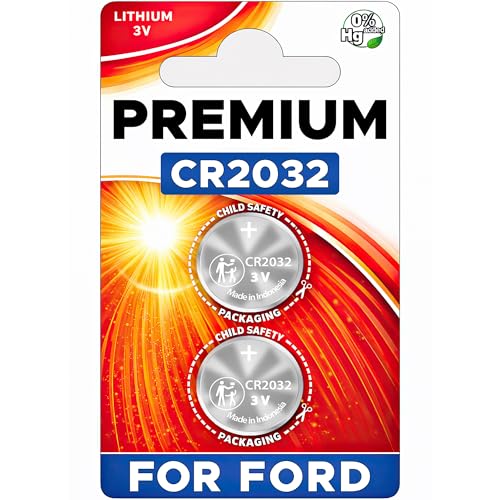
Elite Batteries are Compatible with Ford: F-150/F-250 (1999-2025), Escape (2001-2025), Explorer (1999-2025), Focus (2000-2018), Taurus (1999-2019), Expedition (1999-2025), Edge (2007-2015), E-Series (1999-2024), SuperDuty (1999-2025), Fusion (2006-2016), Mustang (1999-2014), Transit (2015-2025), Ranger (1999-2011, 2019-2025), Fiesta (2011-2019), EcoSport (2018-2024), Maverick (2022-2024), Crown Vic (1998-2011), Transit Connect (2010-2023), Flex (2009-2019), C-Max (2013-2018), Bronco (21-22), Windstar (1999-2003), 500 (05-07), Fusion Hybrid (2010-2016), Freestyle (05-07), Escort (1999-2003), Excursion (2000-2005), Taurus X (08-09), Thunderbird (2002-2005), GT (05-06)

Premium Batteries Replacement is compatible with 2017-2025 Ford and Lincoln intelligent access smart remote fobs. Not compatible with the Ford flipkey or standard keys.
Key Fob Safety and Preparation Steps
Before attempting to reset your Ford Expedition key fob, it’s essential to ensure that you are prepared and aware of safety measures. Taking the right steps can prevent potential issues during the reset process and ensure that your key fob functions correctly afterward. This section outlines the necessary precautions and preparations to make the reset as smooth as possible.
Taking safety precautions is essential when working with electronic components. Ensure your vehicle is parked in a safe location and that you have access to the interior.
Turn off the vehicle
Remove any accessories that may interfere with the reset
Keep the area clear of distractions
Step-by-Step Key Fob Reset Instructions
Resetting your Ford Expedition key fob can seem daunting, but with the right steps, it can be accomplished quickly and easily. This section provides clear, step-by-step instructions to help you reset and sync your key fob, ensuring your vehicle’s security features are fully operational. Follow these guidelines to regain control over your key fob functionality.
Follow these detailed steps to reset your Ford Expedition key fob effectively. Each step is crucial for successful synchronization.
Open the key fob using a flathead screwdriver.
Replace the old battery with a new one. Ensure the positive side is facing the correct direction.
Reassemble the key fob by snapping it back together.
Enter your vehicle and close all doors.
Insert the key into the ignition and turn it to the “On” position without starting the engine.
Press the lock button on the key fob for about five seconds.
Turn the ignition off and remove the key.
Test the key fob to ensure it locks and unlocks the doors.
Key Fob Resetting Challenges and Solutions
Resetting the key fob for a Ford Expedition can sometimes present unexpected challenges, leaving owners frustrated. This section addresses common issues encountered during the resetting process and offers practical solutions to ensure your key fob is synced and functioning properly. Understanding these challenges can help streamline the reset experience and restore your vehicle’s access.
Sometimes, issues may arise even after following the reset steps. Identifying these problems can help you find solutions quickly.
| Symptom | Primary Suspect | Difficulty |
|---|---|---|
| Key fob not responding | Dead battery | 2 |
| Key fob works intermittently | Poor contact | 3 |
| Key fob not syncing | Incorrect programming | 4 |
If the key fob does not respond, check the battery.
If it works intermittently, ensure the contacts are clean and secure.
For syncing issues, recheck the programming steps.
Syncing Multiple Ford Expedition Key Fobs
When managing multiple key fobs for your Ford Expedition, syncing them correctly is essential for seamless access and functionality. This section provides clear instructions on how to synchronize additional key fobs, ensuring that each one operates effectively without interference. Follow these steps to maintain convenience and security for all drivers of your vehicle.
If you have multiple key fobs, syncing them requires additional steps. Each fob must be programmed individually to ensure they all work properly.
Follow the reset steps for each key fob.
Repeat the synchronization process for each fob in the vehicle.
Test each fob after programming to confirm functionality.
Key Fob Battery Lifespan Insights
Understanding the lifespan of your Ford Expedition key fob battery is crucial for maintaining its functionality. A depleted battery can lead to inconvenience and potential lockout situations. This section provides insights into how long you can expect your key fob battery to last and tips for monitoring its performance.
Knowing the lifespan of your key fob battery can prevent unexpected failures. Regularly check and replace batteries as needed.
Average lifespan is typically 2-3 years.
Signs of low battery include reduced range and delayed response.
Key Fob Malfunction and Professional Assistance
Key fob malfunctions can be frustrating, especially when they disrupt your access to your Ford Expedition. Understanding the common issues that can arise with your key fob is essential, as is knowing when to seek professional assistance to ensure a quick resolution. This section will guide you through identifying problems and determining if expert help is necessary.
If the key fob still does not function after following all steps, it may be time to consult a professional. Issues could involve the vehicle’s electronic systems.
Visit a certified Ford dealership for diagnostics.
Consider having a locksmith examine the key fob.
Key Fob Functionality Testing and Maintenance
Understanding the functionality of your Ford Expedition key fob is essential for optimal performance. Regular testing and maintenance can prevent issues that may arise from battery depletion or signal interference. This section will guide you through effective methods to ensure your key fob operates smoothly, enhancing your vehicle’s security and convenience.
Ensure your key fob is functioning correctly by testing it in various scenarios. Regular maintenance can extend the life of your key fob.
Keep spare batteries on hand for quick replacements.
Store the key fob away from extreme temperatures to avoid damage.
Following these steps will help you effectively reset and sync your Ford Expedition key fob. Proper maintenance and timely battery replacements will ensure your key fob remains reliable for years to come.

Evan Armstrong is a lead automotive engineer at Car Troubleshooters with over 15 years of experience in the automotive industry. He has a Master's degree in Automotive Engineering and a deep understanding of how cars work and what it takes to fix them.