
Replacing the battery in a Ford Expedition key fob is a straightforward DIY task that can save time and money. With just a few tools and steps, you can restore your key fob’s functionality without visiting a dealership.
Required Tools for Key Fob Battery Replacement
Before diving into the process of replacing the battery in your Ford Expedition key fob, it’s essential to gather the necessary tools. Having the right equipment on hand will streamline the replacement and ensure you can complete the task efficiently. This section outlines the specific tools you’ll need for a successful DIY fix.
Before starting the battery replacement, ensure you have the necessary tools and supplies. This will make the process smoother and more efficient. You will need:
A small flathead screwdriver
A replacement battery (typically CR2032)
A clean workspace
Make sure you have a well-lit area to work in. This will help you see small components clearly and avoid losing any parts during the process.
Recommended Products

Elite Batteries are Compatible with Ford: F-150/F-250 (1999-2025), Escape (2001-2025), Explorer (1999-2025), Focus (2000-2018), Taurus (1999-2019), Expedition (1999-2025), Edge (2007-2015), E-Series (1999-2024), SuperDuty (1999-2025), Fusion (2006-2016), Mustang (1999-2014), Transit (2015-2025), Ranger (1999-2011, 2019-2025), Fiesta (2011-2019), EcoSport (2018-2024), Maverick (2022-2024), Crown Vic (1998-2011), Transit Connect (2010-2023), Flex (2009-2019), C-Max (2013-2018), Bronco (21-22), Windstar (1999-2003), 500 (05-07), Fusion Hybrid (2010-2016), Freestyle (05-07), Escort (1999-2003), Excursion (2000-2005), Taurus X (08-09), Thunderbird (2002-2005), GT (05-06)

COMPATIBLE WITH AIRTAG & KEY FOBS: Works with Apple AirTag, all major car key fobs (Toyota, Honda, BMW, Ford, Chevrolet, Lexus), fitness trackers, glucose monitors, tire pressure sensors, and any CR2032 / 3V lithium coin battery device.

Easy Key Battery Installation – This kit includes CR2032 coin batteries for effortless installation in Ford key fobs.
Key Fob Internal Components Overview
Understanding the internal components of your Ford Expedition key fob is essential for a successful battery replacement. This section will break down the various parts that make up the fob, helping you identify what to look for and how to handle them during your DIY fix. Familiarity with these components will streamline the process and ensure a smooth replacement.
The Ford Expedition key fob typically consists of a plastic casing that houses the internal components. Understanding its design will help you navigate the disassembly process.
Key fobs usually have a small notch or seam where the two halves meet. This is where you will insert the screwdriver to pry it open. Be gentle to avoid damaging the casing or internal components.
Signs Your Ford Expedition Key Fob Battery Is Dying
Recognizing the signs of a dying key fob battery is crucial for maintaining the convenience of your Ford Expedition. Common indicators include decreased range, unresponsiveness, or the need to press buttons multiple times. Identifying these symptoms early can save you time and frustration, allowing for a simple and timely battery replacement.
Recognizing the signs of a dead key fob battery is crucial. Common symptoms include:
Difficulty unlocking or locking doors
Inconsistent response when pressing buttons
Key fob not working at all
If you experience any of these issues, it’s likely time to replace the battery. Ignoring these symptoms can lead to being locked out of your vehicle.
| Symptom | Primary Suspect | Difficulty (1-5) |
|---|---|---|
| Key fob unresponsive | Dead battery | 2 |
| Intermittent functionality | Weak battery | 3 |
| No response | Completely dead battery | 2 |
Battery Replacement Preparation Steps
Before diving into the battery replacement process for your Ford Expedition key fob, it’s essential to prepare adequately. Gathering the right tools and understanding the necessary steps will ensure a smooth and efficient replacement. This section outlines the preparation needed to tackle this easy DIY fix with confidence.
Preparation is key to a successful battery replacement. Follow these steps to ensure you are ready:
Clear your workspace to avoid losing small parts.
Gather your tools and ensure they are within reach.
Check the battery type required for your key fob.
Confirming the battery type is essential to avoid purchasing the wrong replacement. Most Ford Expedition key fobs use a CR2032 battery, but double-checking is advisable.
Recommended Products

**Please confirm compatibility using the fitment guide located in the product images** This battery will not fit your fob unless it matches one of the examples provided.

Avoid expensive dealer service charges and easily replace your key fob battery yourself

COMPATIBLE WITH AIRTAG & KEY FOBS: Works with Apple AirTag, all major car key fobs (Toyota, Honda, BMW, Ford, Chevrolet, Lexus), fitness trackers, glucose monitors, tire pressure sensors, and any CR2032 / 3V lithium coin battery device.
Key Fob Battery Replacement Steps
Replacing the battery in your Ford Expedition key fob is a straightforward process that can save you time and money. This guide outlines the essential steps to ensure your key fob functions properly again, allowing you to regain access to your vehicle without the hassle of a dealership visit. Follow these simple instructions for a quick DIY fix.
Now that you’re prepared, follow these steps to replace the battery:
Insert the flathead screwdriver into the notch of the key fob.
Gently twist the screwdriver to pry the fob open.
Carefully remove the old battery from its compartment.
Insert the new battery with the positive side facing up.
Snap the key fob halves back together until you hear a click.
Ensure the new battery is seated properly to avoid any issues. A loose battery can lead to intermittent functionality.
Test the Key Fob After Replacement
After replacing the battery in your Ford Expedition key fob, it’s essential to ensure that the new battery is functioning correctly. Testing the key fob will confirm whether the replacement was successful and if the fob is ready for use. Follow these straightforward steps to verify its performance and avoid any future inconveniences.
Once you have replaced the battery, it’s essential to test the key fob. Here’s how:
Stand near your Ford Expedition.
Press the lock and unlock buttons to check functionality.
Observe any response from the vehicle.
If the key fob works as expected, you have successfully completed the battery replacement. If it does not respond, recheck the battery installation and ensure it is seated correctly.
Recommended Products

Premium Batteries Replacement is compatible with 2017-2025 Ford and Lincoln intelligent access smart remote fobs. Not compatible with the Ford flipkey or standard keys.
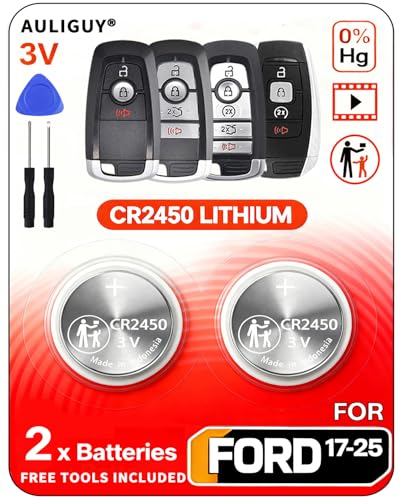
[Original OEM Battery as Provided by Manufacturer] - Our CR2450 batteries are sourced from the same trusted manufacturer used by Ford/Lincoln. Please refer to the fitment guide in the product images to check for compatibility.

**Please confirm compatibility using the fitment guide located in the product images** Not compatible with 2015-2024 trims that have push to start (you push a button to turn on the car rather than insert a key)
Key Fob Functionality Troubleshooting Steps
When your Ford Expedition key fob starts to show signs of malfunction, it can be frustrating. Understanding the common issues that affect key fob functionality is essential for effective troubleshooting. This section outlines practical steps to identify and resolve problems, ensuring your key fob works smoothly again.
If the key fob still does not work after replacing the battery, consider these troubleshooting steps:
Inspect for physical damage on the fob.
Check for corrosion on the battery contacts.
Reprogram the key fob if necessary.
Sometimes, reprogramming the key fob may be required. This can often be done through the vehicle’s onboard system.
Maintain Your Key Fob for Longevity
To ensure your Ford Expedition key fob remains functional for years to come, regular maintenance is essential. Simple practices can prevent common issues and extend the life of your key fob, allowing you to avoid costly replacements. This section outlines effective strategies to keep your key fob in optimal condition.
To extend the life of your key fob, consider the following maintenance tips:
Avoid exposing the fob to moisture.
Store the fob in a safe place when not in use.
Replace the battery promptly when symptoms appear.
Regular maintenance can prevent unexpected failures and ensure your key fob remains functional for years to come.
Taking these steps will help maintain your key fob’s performance and reliability.

Evan Armstrong is a lead automotive engineer at Car Troubleshooters with over 15 years of experience in the automotive industry. He has a Master's degree in Automotive Engineering and a deep understanding of how cars work and what it takes to fix them.