
Programming a Nissan Altima key fob can be accomplished at home without professional assistance. By following a straightforward procedure, you can sync your key fob to your vehicle, ensuring it functions correctly for locking and unlocking doors.
Essential Tools for Key Fob Programming
Before diving into the programming process for your Nissan Altima key fob, it’s crucial to gather the right tools. Having the necessary equipment on hand will streamline the DIY experience and ensure a successful reprogramming. This section outlines the essential tools you’ll need to effectively program your key fob.
Before starting the programming process, ensure you have the following items ready. This preparation will streamline your efforts and minimize interruptions.
Nissan Altima key fob
Vehicle owner’s manual
Working key (if available)
Pen and paper for notes
Having these items on hand will make the programming process smoother and more efficient.
Recommended Products
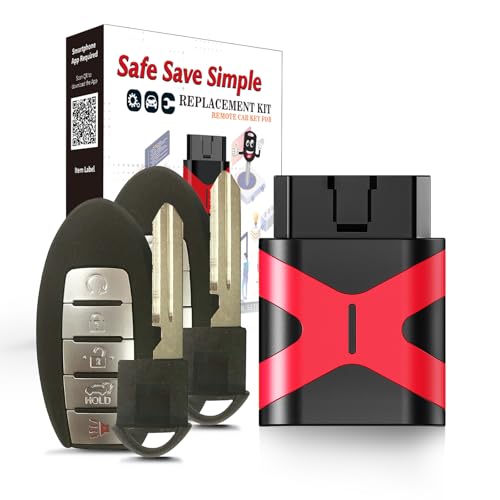
COMPATIBILITY: Compatible with FCC ID KR5S180144014, 47 Chip , This Remote Key Fob Replacement for Nissan Altima Maxima Murano Pathfinder 2013 2014 2015

COMPATIBILITY: Compatible with FCC ID KR5S180144014, 47 Chip , This Remote Key Fob Replacement for Nissan Altima Maxima Murano Pathfinder 2013 2014 2015

【Programming Methord】DIY programming is NOT available, it's necessary to be cut and programmed by a qualified dealer or locksmith.【NOTE】This smart key fob supports push-button vehicles only, not for regular key or keyed Ignition vehicles.
Nissan Altima Preparation for Key Fob Programming
Before diving into the programming process for your Nissan Altima key fob, it’s essential to gather the necessary tools and prepare your vehicle. This preparation ensures a smooth and efficient programming experience, allowing you to quickly regain access to your car without the need for professional assistance. Understanding these initial steps will set the stage for successful key fob programming.
Proper preparation of your Nissan Altima is essential for successful key fob programming. Follow these steps to set up your vehicle.
Enter the vehicle and close all doors.
Insert the working key into the ignition.
Turn the key to the “On” position without starting the engine.
Wait for 10 seconds and then turn the key back to the “Off” position.
Remove the key from the ignition.
This setup ensures that the vehicle is ready to accept the new key fob programming.
Key Fob Programming Step-by-Step
Programming your Nissan Altima key fob can seem daunting, but it’s a straightforward process that you can tackle yourself. This step-by-step guide will walk you through each phase, ensuring that you can easily sync your key fob with your vehicle without the need for professional assistance. Follow these instructions carefully for a smooth programming experience.
With your vehicle prepared, you can now program the key fob. Follow these detailed steps carefully.
Insert the working key into the ignition.
Turn the key to the “On” position and then back to “Off” five times within 10 seconds.
Leave the key in the “On” position on the fifth turn.
Press any button on the new key fob.
Turn the key back to “Off” and remove it from the ignition.
The key fob should now be programmed. Test it to confirm that it locks and unlocks the doors.
Key Fob Programming Issue Solutions
When programming your Nissan Altima key fob, various issues can arise that may hinder the process. Understanding these common problems and their solutions can save you time and frustration. This section addresses typical key fob programming challenges and offers practical fixes to ensure your remote works seamlessly.
If you encounter problems during programming, several factors may be at play. Identifying these issues can save time and frustration.
| Symptom | Primary Suspect | Difficulty (1-5) |
|---|---|---|
| Key fob not responding | Incorrect programming steps | 3 |
| Key fob works intermittently | Weak battery | 2 |
| Vehicle does not recognize fob | Faulty fob or vehicle issue | 4 |
Addressing these common issues can help ensure successful key fob programming.
Recommended Products

**Please confirm compatibility using the fitment guide located in the product images** This battery will not fit unless your key fob matches one of the examples provided.

Key Fob Battery Replacement is compatible with Nissan smart key fobs; models: Rogue, Altima, Sentra, Versa, Pathfinder, Murano, Rogue Sport, Maxima, Kicks, Titan, Frontier, Armada, Leaf, Juke, Quest, Titan XD, Rogue Select, 370Z, GT-R, 400Z, Ariya, and Z, and Infiniti.

Long-lasting and durable: Batteries come directly from trusted battery suppliers in China, ensuring seamless compatibility and reliable keychain performance.
Key Fob Battery Maintenance Tips
Maintaining the battery of your Nissan Altima key fob is essential for ensuring its longevity and functionality. Regular checks and proper care can prevent unexpected failures and enhance the overall performance of your keyless entry system. Here are some practical tips to keep your key fob battery in optimal condition.
A weak battery can hinder the functionality of your key fob. Regular maintenance includes checking and replacing the battery when necessary.
Open the key fob using a small flathead screwdriver.
Remove the old battery and note its specifications.
Insert a new battery of the same type.
Reassemble the key fob and test its functionality.
Keeping the battery fresh will prevent future programming issues.
Nissan Altima Key Fob Features and Limitations
Understanding the features and limitations of the Nissan Altima key fob is essential for maximizing its functionality. This section explores the various capabilities of the key fob, including remote access and security features, while also addressing any constraints you may encounter. Familiarizing yourself with these aspects will enhance your overall experience with your vehicle.
Not all key fobs are created equal. Understanding the limitations of your Nissan Altima key fob can help manage expectations.
Range limitations can affect performance.
Multiple fobs may require individual programming.
Compatibility issues may arise with aftermarket fobs.
Being aware of these factors can help you make informed decisions regarding key fob usage.
Key Fob Functionality Verification Steps
Before diving into the programming process for your Nissan Altima key fob, it’s essential to verify that the fob is functioning correctly. This ensures that any issues you encounter during programming are not due to a malfunctioning device. Follow these steps to confirm that your key fob is ready for the programming process.
After programming, verify that all functions work as intended. This final check ensures that your efforts were successful.
Test all buttons on the key fob.
Check the range by standing a few feet away from the vehicle.
Confirm that the vehicle responds to the key fob commands.
If all functions operate correctly, your key fob is now fully programmed and ready for use.

Evan Armstrong is a lead automotive engineer at Car Troubleshooters with over 15 years of experience in the automotive industry. He has a Master's degree in Automotive Engineering and a deep understanding of how cars work and what it takes to fix them.