
Changing the battery in a Ford Fiesta key fob is a straightforward process that can be completed in under five minutes. This DIY fix requires minimal tools and can save you time and money compared to a dealership visit.
Essential Tools for Ford Fiesta Key Fob Battery Swap
Before starting the battery replacement, ensure you have the right tools and supplies on hand. You will need a small flat-head screwdriver, a replacement battery, and a clean workspace. The specific battery type for most Ford Fiesta key fobs is CR2032.
| Tool/Supply | Purpose |
|---|---|
| Small flat-head screwdriver | Open the key fob |
| Replacement battery | Replace the old battery |
| Clean workspace | Prevent loss of small parts |
Recommended Products

**Please confirm compatibility using the fitment guide located in the product images** Not compatible with 2015-2024 trims that have push to start (you push a button to turn on the car rather than insert a key)
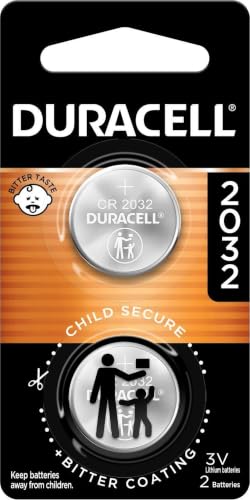
COMPATIBLE WITH AIRTAG & KEY FOBS: Works with Apple AirTag, all major car key fobs (Toyota, Honda, BMW, Ford, Chevrolet, Lexus), fitness trackers, glucose monitors, tire pressure sensors, and any CR2032 / 3V lithium coin battery device.
Ford Fiesta Key Fob Battery Change Preparation
Preparation is key to a successful battery change. Find a well-lit area to work in, and ensure you have a clean surface to avoid losing any small components. It’s advisable to keep the new battery and tools organized to streamline the process.
Ford Fiesta Key Fob Battery Change Safety Tips
Changing the battery in your Ford Fiesta key fob can be a straightforward task, but safety should always come first. Understanding the proper precautions can help prevent damage to the fob and ensure your personal safety during the process. Here are essential safety tips to keep in mind while replacing the battery.
While changing the battery is safe, take these precautions:
Avoid using excessive force when opening the key fob.
Handle the new battery with care to prevent damage.
Keep small parts away from children and pets.
Ford Fiesta Key Fob Battery Replacement Steps
Changing the battery in your Ford Fiesta key fob is a straightforward task that can save you time and money. With just a few simple steps, you can quickly replace the battery and ensure your key fob functions properly. Follow the instructions below to complete this fast DIY fix in about five minutes.
Follow these steps to change the battery in your Ford Fiesta key fob efficiently.
Locate the seam on the key fob where the two halves meet.
Insert the flat-head screwdriver into the seam and gently pry apart the two halves.
Remove the old battery from its compartment.
Insert the new CR2032 battery, ensuring the positive (+) side is facing up.
Snap the key fob halves back together until you hear a click.
Recommended Products

COMPATIBLE WITH AIRTAG & KEY FOBS: Works with Apple AirTag, all major car key fobs (Toyota, Honda, BMW, Ford, Chevrolet, Lexus), fitness trackers, glucose monitors, tire pressure sensors, and any CR2032 / 3V lithium coin battery device.

Pack Including: Two (2) Pieces CR2032 Remote Key Fob Batteries and Opening/Pry Tools - Five item bundle (total 5pcs), Please check Amazon details Confirmed Fit to ensure that this is the correct battery for your remote.
Ford Fiesta Key Fob Battery Issues
Many Ford Fiesta owners encounter issues with their key fob batteries, which can lead to inconvenience when trying to unlock or start their vehicles. Understanding the common problems associated with these batteries is essential for a quick and effective DIY solution. This section delves into the typical battery-related challenges faced by Fiesta drivers and how to address them efficiently.
If the key fob does not work after replacing the battery, check the following:
Ensure the battery is installed correctly.
Inspect the battery for any damage.
Verify that the key fob is properly closed.
Ford Fiesta Key Fob Troubleshooting Tips
If you’re experiencing issues with your Ford Fiesta key fob, understanding common problems can help you troubleshoot effectively. This section provides practical tips to identify and resolve issues, ensuring your key fob functions smoothly and reliably. With these insights, you can save time and avoid unnecessary trips to the dealership.
Understanding common issues with key fobs can help you troubleshoot effectively. Here are some problems you might encounter:
| Issue | Possible Cause | Solution |
|---|---|---|
| Key fob not responding | Dead battery | Replace battery |
| Key fob buttons stuck | Dirt or debris | Clean the buttons |
| Key fob signal weak | Interference | Move away from electronic devices |
Ford Fiesta Key Fob Upgrade Options
Upgrading your Ford Fiesta key fob can enhance its functionality and convenience. Whether you’re looking for improved range, added features, or a more modern design, there are several options available. This section explores various key fob upgrade possibilities to help you find the perfect fit for your vehicle.
If your key fob frequently malfunctions, consider upgrading to a newer model. Newer key fobs often come with enhanced features such as remote start and additional security options. Research models compatible with your Ford Fiesta for a seamless upgrade.
Recommended Products

COMPATIBILITY: Compatible with FCC ID: CWTWB1U793. For Full Compatible List, Please Check Our Product Description and Vehicle Fitment Tool. Each Car Key Fob Remote Replacement Comes with Batteries and Electronics, It Is Fully Installed and Is Pre-Tested to Ensure Quality. This Remote Key Fob Replacement Is Compatible with 2013-2019 C-MAX, 2013-2019 Escape , 2014-2019 Fiesta, 2012-2024 Focus, 2013-2019 Transit, 2014-2019 Transit Connect

{Fits Models} : This key fob cover compatible with Ford Focus (2012-2019),C-Max (2013-2018),Fiesta (2011-2019) etc.(fit for ford 3 buttons key remote)*NOTE*--Please refer to the matching keys shown on the picture.Because of the different years even if the same car model,the key fob may also be different

HIGH-QUALITY: Every Single Keyless Entry Remote Control Car Flip Key Fob is Fully Pre-tested by Professional Locksmith Tools before Shipping. All Our Key Fobs are Pre-installed with Battery and Electronics.
Ford Fiesta Key Fob Replacement Costs
When considering the replacement costs for a Ford Fiesta key fob, it’s essential to understand the various factors that influence pricing. From dealership fees to DIY options, the expenses can vary significantly. This section breaks down the typical costs associated with key fob replacement, helping you make an informed decision.
Replacement key fobs can vary in price depending on features and compatibility. Here’s a quick overview:
| Key Fob Type | Estimated Cost |
|---|---|
| Standard key fob | $50 – $100 |
| Smart key fob | $100 – $300 |
| Aftermarket options | $30 – $80 |
Testing Ford Fiesta Key Fob After Battery Change
After replacing the battery in your Ford Fiesta key fob, it’s essential to ensure that the new battery is functioning correctly. This section will guide you through simple tests to confirm that your key fob is working as intended, helping you avoid any potential issues when accessing your vehicle.
After completing the battery change, test the key fob to ensure it functions correctly. Stand near your vehicle and press the buttons to verify that they respond appropriately. If issues persist, further diagnostics may be necessary.
Changing the battery in your Ford Fiesta key fob is a simple task that can be done quickly at home. By following these steps and tips, you can ensure your key fob remains functional and reliable.

Evan Armstrong is a lead automotive engineer at Car Troubleshooters with over 15 years of experience in the automotive industry. He has a Master's degree in Automotive Engineering and a deep understanding of how cars work and what it takes to fix them.