
Key Takeaways
- Importance of Addressing the Airbag Light: The airbag light on your Nissan Altima indicates potential issues with the airbag system, which is crucial for passenger safety during collisions.
- Common Triggers for Activation: Airbag light can be activated by faulty sensors, loose connections, battery issues, seatbelt malfunctions, or a faulty airbag module.
- Necessary Tools for Resetting: A diagnostic scanner is ideal for checking and clearing airbag-related trouble codes, while a paperclip or jumper wires can be an alternative for manual resetting.
- Step-by-Step Resetting Guide: Follow clear steps—including turning off the ignition, disconnecting the battery, and either using a diagnostic scanner or a paperclip—to reset the airbag light effectively.
- Troubleshooting Persistent Issues: If the airbag light remains on post-reset, inspect sensors, wiring connections, battery health, and seatbelt sensors for underlying problems that require attention.
- Monitoring Other Warning Lights: Be aware of accompanying warning lights (like seatbelt, check engine, brake, tire pressure, and traction control) for a comprehensive understanding of your vehicle’s safety status.
Have you ever noticed that pesky airbag light glowing on your Nissan Altima’s dashboard? It can be frustrating, especially when you want peace of mind while driving. You’re not alone—many drivers face this issue, and it’s essential to address it for your safety.
Understanding the Airbag Light
The airbag light on your Nissan Altima dashboard indicates a possible issue with the airbag system. Addressing this light promptly is crucial for your safety.
Importance of the Airbag System
The airbag system protects you and your passengers in the event of a collision. It deploys airbags during an accident, reducing the severity of injuries. A functioning airbag system is essential for your safety, making it vital to ensure the airbag light is off at all times.
Common Reasons for Airbag Light Activation
Several factors can trigger the airbag light in your Nissan Altima:
- Faulty Sensors: The system uses sensors to detect collisions. A malfunctioning sensor may cause the light to stay on.
- Loose Connections: Loose or damaged wiring can interrupt the airbag circuit, activating the warning light.
- Battery Issues: A weak or failing battery can sometimes affect the airbag system, resulting in the light illuminating.
- Seatbelt Malfunction: Problems with seatbelt buckles can trigger the airbag light, indicating a need for inspection.
- Faulty Airbag Module: The airbag control module might be malfunctioning, making the system unable to function properly.
Identifying these issues can help you troubleshoot the problem effectively.
Tools Needed for Resetting
Resetting the airbag light on a Nissan Altima requires a few specific tools. Having these on hand simplifies the process and enhances safety.
Recommended Products

[Diagnose Like a Pro] BlueDriver Pro is a professional OBD2 scanner and diagnostic tool that helps you scan, understand, and clear vehicle trouble codes with confidence. Turn your phone into a powerful car diagnostic scanner—no guesswork, no unnecessary repairs.

[Diagnose Like a Pro] BlueDriver Pro is a professional OBD2 scanner and diagnostic tool that helps you scan, understand, and clear vehicle trouble codes with confidence. Turn your phone into a powerful car diagnostic scanner—no guesswork, no unnecessary repairs.

【Comprehensive Performance Testing】V011 OBD2 Scanner provides a complete diagnostic solution, giving you a thorough understanding of your vehicle's condition. It supports a variety of performance tests, support 9 protocols,👍automotive fault clearing,including fast reading of DTCs, access to electronic emission readiness, turning off CEL or MIL, resetting monitors, reading live data and retrieving the vehicle's VIN, freeze frame, sensor data, data streaming, diagnostic reports, onboard monitoring, live data streaming, and more. With these features, you can monitor your car's performance in real time and discover potential problems before they become major issues.
Diagnostic Scanner
A diagnostic scanner is essential for checking and clearing diagnostic trouble codes (DTCs) related to the airbag system. These scanners connect to the vehicle’s OBD-II port, providing insight into the specific issue triggering the airbag light. Look for a scanner capable of reading airbag codes to ensure accuracy. Many aftermarket options are available, but a higher-quality scanner may yield better results.
Paperclip or Jumper Wires
A paperclip or jumper wires can serve as an economical alternative for resetting the airbag light. These tools allow you to connect specific terminals in the airbag diagnostic port. This method can trigger the reset sequence. Ensure you locate the correct pins in the harness, often labeled in the vehicle’s manual. Following this step correctly resets the airbag system without needing specialized equipment.
Step-by-Step Guide on How to Reset the Airbag Light on a Nissan Altima
Resetting the airbag light on a Nissan Altima involves a few straightforward steps. You can use a diagnostic scanner or perform a manual reset with simple tools.
Recommended Products

OBD2 SCANNER & BATTERY TESTER IN ONE – The INNOVA 5210 OBD2 scanner not only reads and clears check engine light and ABS codes (coverage may vary) but also functions as a car battery tester to check alternator health and prevent unexpected breakdowns.

Practical Function: This diagnostic scanner is designed to rapidly scan fault codes within the engine to help you accurately identify fault types. It displays precise sensor data, enabling you to quickly check the issues for an efficient and hassle-free diagnostic process

【TURN OFF CEL】 This AL319 car scanner diagnostic tool supports Reading and Clearing DTCs, DTC Look Up, displaying Live Data, Freeze Frame & I/M Readiness, view vehicle information, etc., to figure out the root cause of the Check Engine Light (CEL) and turn it off, helping you catch any potential issues early and avoid excessive costs from unnecessary repairs.
Preparing the Vehicle
- Turn Off the Ignition: Ensure the ignition is completely off to avoid any electrical issues.
- Disconnect the Battery: Remove the negative terminal from the battery. Use a wrench for this. Wait for at least 10 minutes, allowing the vehicle’s systems to reset.
- Check the Wiring: Inspect the airbag system’s connectors and wires for any visible damage. Ensure all connections are secure before proceeding.
Using a Diagnostic Scanner
- Connect the Scanner: Plug the diagnostic scanner into the OBD-II port, usually located under the dashboard near the driver’s seat.
- Turn on the Ignition: Switch the ignition to the “On” position without starting the engine. This activates the vehicle’s systems.
- Access Airbag Codes: Follow the scanner’s prompts to navigate to the airbag section. Retrieve any trouble codes that indicate issues with the airbag system.
- Clear the Codes: Select the option to clear or reset the codes. This should turn off the airbag light on the dashboard.
- Disconnect the Scanner: Once the codes are cleared, remove the scanner from the OBD-II port.
Manual Reset Using a Paperclip
- Locate the Airbag Diagnostic Connector: Find the connector under the dashboard near the steering column. It’s usually a white or yellow connector.
- Prepare the Paperclip: Straighten a paperclip or use jumper wires. This will create a bridge between specific terminals.
- Connect the Paperclip: Insert the paperclip into the diagnostic connector terminals marked as “Consult” or “Short.” Shorting these terminals will initiate the reset procedure.
- Turn on the Ignition: Switch the ignition to the “On” position without starting the engine. The airbag light should start blinking.
- Wait for the Sequence: Observe the blinking pattern. Once the light remains on for about 7 seconds, remove the paperclip. This should reset the airbag light.
- Reconnect the Battery: Reattach the negative battery terminal. Start the vehicle to check if the airbag light is off.
Following these steps can help you reset the airbag light on your Nissan Altima and ensure your airbag system functions correctly.
Troubleshooting Common Issues
When the airbag light stays on after a reset, it indicates underlying issues with the airbag system still need to be addressed. Here are some common concerns you might encounter:
Recommended Products
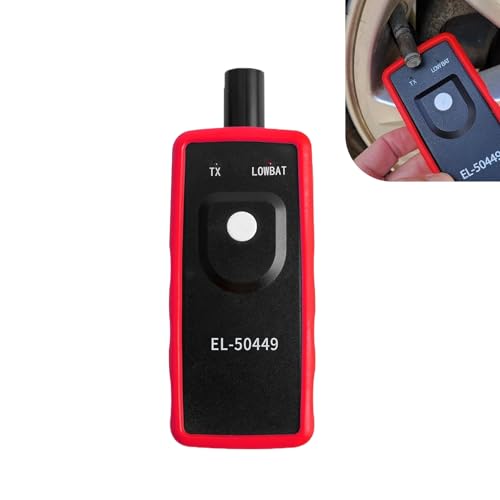
Key Functions: The battery not included. This tpms relearn tool is for vehicles with direct TPMS. It activates sensors, clears dashboard warning lights, and checks for bad or low-power sensors. It is compatible with many major vehicle brands.

Troubleshoot Malfunctions: This SRS airbag reset tool simulates airbag load to quickly turn off the SRS warning light on the dashboard. It effectively fixes errors caused by airbag removal, replacement and modification, and restores the normal operation of the vehicle's electronic control system

Core Function: The TPMS relearn tool is primarily designed to reset the vehicle’s tire pressure monitoring system. It can calibrate tire pressure sensors, ensuring the TPMS operates normally and promptly transmits alerts about abnormal tire pressure, thereby safeguarding driving safety during every journey.
Airbag Light Still On
- Faulty Sensors: Sometimes, airbag sensors malfunction. Check each sensor for signs of damage or wear.
- Loose Connections: Loose wiring or connectors can prevent proper communication in the airbag system. Inspect connectors for secure fits and clean any corrosion.
- Battery Issues: Low battery voltage can trigger the airbag light. Ensure your battery is in good condition and fully charged.
- Seatbelt Malfunctions: Disabled seatbelt sensors may also activate the airbag light. Validate the seatbelt connectors for proper functionality.
- Faulty Airbag Module: If the module itself is faulty, a professional assessment might be necessary to replace or repair it.
Other Warning Lights Illuminated
- Belt Reminder Light: If this light accompanies the airbag light, it signifies a seatbelt issue. Ensure all seatbelts are secured and functioning.
- Check Engine Light: This light may illuminate due to issues affecting the entire vehicle. Check your owner’s manual or a diagnostic scanner for specific error codes.
- Brake Warning Light: This light, along with the airbag light, can indicate a broader safety concern. Ensure your brake system is functioning well.
- Tire Pressure Light: If this is illuminated alongside the airbag light, verify your tire pressures. Low tire pressure can affect driving safety.
- Traction Control Light: If this light appears, it may relate to the airbag system’s stability control features. Investigate any underlying issues with the traction system.
By closely monitoring these lights, you can quickly identify issues impacting your Nissan Altima’s safety features. Addressing them promptly ensures your vehicle remains roadworthy.
Conclusion
Getting the airbag light reset on your Nissan Altima doesn’t have to be a hassle. By following the steps outlined in this guide you can tackle the issue confidently and ensure your safety on the road. Remember to keep an eye on any other warning lights that pop up as they can give you clues about your vehicle’s health.
If the light persists after your efforts don’t hesitate to consult a professional. Your safety is worth it and staying proactive about your car’s maintenance will help keep you and your passengers protected. Happy driving!
Frequently Asked Questions
Why did my Nissan Altima’s airbag light come on?
The airbag light can illuminate due to several issues, such as faulty sensors, loose connections, battery problems, or a malfunction in the seatbelt system. It’s important to address this light quickly, as it indicates potential risks to occupant safety during a crash.
How can I reset the airbag light on my Nissan Altima?
You can reset the airbag light using two methods: a diagnostic scanner to check and clear the airbag system codes or a manual reset with a paperclip to short the diagnostic connector. Both methods require some preparation, like turning off the ignition and disconnecting the battery.
What tools do I need to reset the airbag light?
To reset the airbag light, you will need a diagnostic scanner to read and clear trouble codes. If opting for a manual reset, a paperclip or jumper wires can be used as an alternative to achieve the desired connection in the diagnostic connector.
What should I do if the airbag light stays on after resetting?
If the airbag light remains on after resetting, there might still be underlying issues, such as faulty sensors, loose connections, or problems with the airbag module. It’s important to check these factors or consult a professional for further diagnostics.
What other warning lights might appear with the airbag light?
Alongside the airbag light, you may see warning lights such as the belt reminder light, check engine light, brake warning light, tire pressure light, and traction control light. These indicators can provide additional insights into your vehicle’s overall safety status.

Ben Wilkinson is a an experienced mechanic with over 10 years of experience in the automotive repair industry. He is highly skilled in diagnosing and repairing a wide range of car-related issues, from basic maintenance tasks to more complex repairs.