
Key Takeaways
- Understand Airbag Lights: The airbag light indicates potential issues with your vehicle’s airbag system, which is crucial for safety during collisions.
- Common Causes for Activation: Familiarize yourself with common reasons for the airbag light turning on, such as faulty sensors, loose connections, and battery issues.
- Resetting Methods: There are three effective methods to reset the airbag light on your Nissan Rogue: using the ignition key, an OBD-II scanner, or disconnecting the battery.
- Precautionary Measures: Always prioritize safety by disconnecting the battery, waiting 10 minutes, wearing safety gear, and inspecting the vehicle before attempting to reset the light.
- Troubleshooting Persistent Issues: If the airbag light reactivates after resetting, investigate potential faults in sensors, connections, and check for OBD-II error codes.
- Seek Professional Help: When basic troubleshooting fails, consult a certified mechanic for comprehensive diagnostics and repairs to ensure your vehicle’s safety systems function correctly.
Have you ever noticed that pesky airbag light glowing on your Nissan Rogue’s dashboard? It can be frustrating, especially when you’re trying to ensure your vehicle is safe and ready for the road. You might even wonder if it’s a sign of a serious issue or just a minor glitch.
Understanding Airbag Lights
Airbag lights serve as vital indicators of your vehicle’s safety system. When illuminated, they signal potential issues that may affect airbag performance during a collision.
Importance of Airbag Lights
Airbag lights play a crucial role in vehicle safety. When the airbag system encounters a malfunction, the light alerts you to check the system immediately. Ignoring a lit airbag light could mean your airbags may not deploy properly in an accident, increasing the risk of injury.
Common Reasons for Airbag Light Activation
Several factors can trigger your airbag light.
- Faulty Sensors: Sensors monitor airbag readiness. A malfunction or improper installation can cause the light to turn on.
- Loose Connections: Loose wiring or connectors in the airbag system can interrupt signals, leading to activation of the light.
- Crash Sensors: After minor accidents, sensors might activate the light even if airbags didn’t deploy. Checking them is essential.
- Battery Issues: A weak or dying battery can result in erratic alerts, including an illuminated airbag light.
- Recent Repairs: If you’ve serviced components related to airbags, the light may stay on until proper resets are performed.
Understanding these aspects helps maintain your Nissan Rogue for optimal safety.
Methods to Reset Airbag Light
You can reset the airbag light on your Nissan Rogue using several methods. Here are three effective approaches:
Recommended Products

⚠️【Important Tips Before Purchcase】1. Compatible with standard OBD II vehicles from 1996 onward in the US market. ⚠️2. Due to the Safe Gateway (SGW) / FCA AutoAuth security system, this tool cannot access OBDII modules to clear codes for FCA vehicles (including Chrysler, Dodge, Jeep, etc.) manufactured after 2017. ⚠️And vehicle brands equipped with a SGW are not supported either. ⚠️3. Not support TPMS or other service functions. Only the basic OBDII code reader. Functions not universal, please s-end mes-sage via Ama-zon or 📞autelofficial @ outlook . com📞 to check before order.

Practical Function: This diagnostic scanner is designed to rapidly scan fault codes within the engine to help you accurately identify fault types. It displays precise sensor data, enabling you to quickly check the issues for an efficient and hassle-free diagnostic process
Method 1: Using the Ignition Key
- Insert your key into the ignition.
- Turn the key to the “On” position without starting the engine.
- Wait for the airbag light to illuminate for seven seconds.
- Turn the key to the “Off” position and remove it.
- Repeat this process three times.
- On the fourth turn, leave the key in the “On” position. The airbag light should flash, indicating a successful reset.
Method 2: Using an OBD-II Scanner
- Obtain an OBD-II scanner; many auto parts stores offer rentals.
- Locate the OBD-II port under your dashboard.
- Plug the scanner into the port and turn on the ignition.
- Follow the scanner’s instructions to access the airbag system.
- Clear any error codes displayed, which will reset the airbag light.
- Disconnect the scanner once complete.
Method 3: Disconnecting the Battery
- Park your Nissan Rogue and engage the parking brake.
- Open the hood and locate the negative battery terminal.
- Using a wrench, loosen the negative terminal clamp and disconnect it.
- Wait for at least 10 minutes to allow the car’s systems to reset.
- Reconnect the negative clamp and tighten it securely.
- Start the vehicle and check if the airbag light has turned off.
Using any of these methods can help clear the airbag light and ensure your vehicle’s safety systems are functioning correctly.
Precautions to Take Before Resetting
Before resetting the airbag light in your Nissan Rogue, take necessary precautions to ensure safety and effectiveness.
Recommended Products

【Comprehensive Performance Testing】V011 OBD2 Scanner provides a complete diagnostic solution, giving you a thorough understanding of your vehicle's condition. It supports a variety of performance tests, support 9 protocols,👍automotive fault clearing,including fast reading of DTCs, access to electronic emission readiness, turning off CEL or MIL, resetting monitors, reading live data and retrieving the vehicle's VIN, freeze frame, sensor data, data streaming, diagnostic reports, onboard monitoring, live data streaming, and more. With these features, you can monitor your car's performance in real time and discover potential problems before they become major issues.

[Diagnose Like a Pro] BlueDriver Pro is a professional OBD2 scanner and diagnostic tool that helps you scan, understand, and clear vehicle trouble codes with confidence. Turn your phone into a powerful car diagnostic scanner—no guesswork, no unnecessary repairs.

[Easy to Use—Work Out of the Box] + [FOXWELL 2026 New Version] FOXWELL NT604 Elite scan tool is the 2026 new version from FOXWELL, designed for car owners who want to figure out the cause of issues before fixing car problems by scanning common systems like ABS, SRS, engine, and transmission. The NT604 Elite obd2 scanner diagnostic tool comes with the latest software—no need to waste time downloading software first. Plug the scanner into the OBDII port with OBDII cable to start the diagnosis.
Safety Measures
- Disconnect the Battery: Disconnect the negative battery terminal first. This helps avoid accidental deployment of airbags.
- Wait for 10 Minutes: Allow at least 10 minutes for the capacitors in the airbag system to discharge completely.
- Wear Safety Gear: Use safety glasses and gloves while working on your vehicle. This protects you in case of any unexpected incidents.
- Work in a Well-Ventilated Area: Make sure you perform this procedure in a space that’s well-ventilated to avoid inhaling any fumes or harmful gases.
Checking for Underlying Issues
- Inspect Sensors and Connections: Look for loose or damaged wiring around airbag sensors. Tighten any loose connections.
- Scan for Error Codes: Use an OBD-II scanner to check for any diagnostic trouble codes (DTCs). This gives insight into any underlying issues.
- Review Recent Repairs: If you’ve had recent work done, check to see if anything may have inadvertently affected the airbag system.
- Consult the Manual: Refer to your Nissan Rogue owner’s manual for specific guidance on airbag system maintenance. Always follow manufacturer recommendations.
Troubleshooting After Reset
After resetting the airbag light on your Nissan Rogue, monitor the light’s behavior. It’s essential to confirm it stays off to ensure the system is functioning correctly.
Recommended Products

OBD2 SCANNER & BATTERY TESTER IN ONE – The INNOVA 5210 OBD2 scanner not only reads and clears check engine light and ABS codes (coverage may vary) but also functions as a car battery tester to check alternator health and prevent unexpected breakdowns.
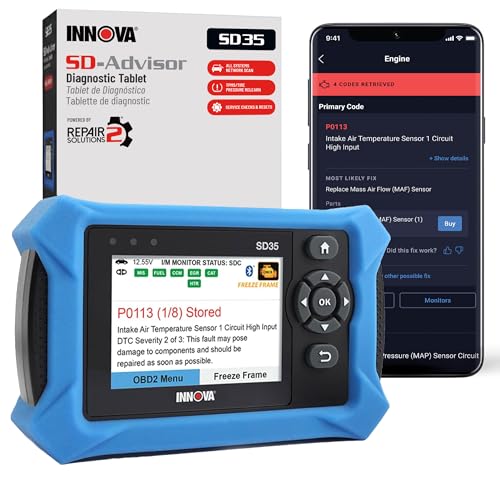
OBD2 SCANNER FOR ALL SYSTEMS – The INNOVA SD35 is a tablet-based OBD2 scanner designed for advanced diagnostics. Read and clear check engine light, ABS, SRS, and TPMS codes, plus test your car battery and alternator to prevent unexpected failures. Vehicle coverage may vary. Please use Innova’s Coverage Checker to verify compatibility.
When the Light Remains On
If the airbag light stays illuminated after a reset, don’t ignore it. Look into these potential issues:
- Faulty Sensors: Inspect the airbag sensors for damage. A malfunctioning sensor can trigger the light.
- Loose Connections: Check the wiring and connectors under the seats and dashboard. Loose or damaged connections may prevent the airbag system from functioning.
- OBD-II Error Codes: Reconnect the OBD-II scanner to check for any stored codes. This can provide insight into what may be causing the problem.
If troubleshooting doesn’t resolve the issue, consider further steps to address it.
Professional Help and Diagnosis
Seeking professional assistance becomes necessary if basic troubleshooting doesn’t work. Here’s what you can expect:
- Diagnostic Tests: Technicians use specialized equipment to perform comprehensive diagnostics on the airbag system.
- Safety Inspections: Professionals verify the integrity of all related components to ensure everything operates safely.
- Repair Recommendations: Based on their findings, mechanics may suggest specific repairs or parts replacements.
Consulting a certified mechanic ensures that any unseen issues receive proper attention, keeping your Nissan Rogue safe and compliant.
Conclusion
Resetting the airbag light on your Nissan Rogue can be a straightforward process when you know the right steps. By following the methods outlined in this guide you can help ensure your vehicle’s safety systems are functioning properly.
Remember to stay vigilant and monitor the airbag light after resetting it. If it lights up again don’t hesitate to investigate further or seek professional assistance. Keeping your Nissan Rogue in top shape not only enhances your driving experience but also keeps you and your passengers safe on the road. Stay safe and happy driving!
Frequently Asked Questions
What does it mean when the airbag light is on in my Nissan Rogue?
The airbag light indicates there’s a potential problem with the vehicle’s airbag system. This could be due to faulty sensors, loose connections, or other issues affecting airbag performance during an accident. Ignoring this light can increase the risk of injury if the airbags fail to deploy.
How can I reset the airbag light on my Nissan Rogue?
You can reset the airbag light by using three methods: 1) Cycle the ignition key through the “On” and “Off” positions. 2) Use an OBD-II scanner to clear errors. 3) Disconnect the negative battery terminal for at least 10 minutes to reset the system.
Is it safe to drive with the airbag light on?
No, it’s not safe to drive with the airbag light on. This warning indicates a malfunction in the airbag system, which could lead to airbags not deploying in a crash, significantly increasing the risk of serious injury.
What should I do if the airbag light stays on after resetting?
If the airbag light remains illuminated after resetting, it indicates an ongoing issue. Check for faulty sensors or loose connections, scan for diagnostic trouble codes with an OBD-II scanner, and consider seeking help from a certified mechanic for further diagnostics and repairs.
How can I prevent the airbag light from coming on?
To prevent the airbag light from illuminating, regularly inspect the airbag system, ensure connections are tight, and avoid DIY repairs that may affect sensors. Follow your Nissan Rogue’s maintenance schedule and address any issues as they arise.

Ben Wilkinson is a an experienced mechanic with over 10 years of experience in the automotive repair industry. He is highly skilled in diagnosing and repairing a wide range of car-related issues, from basic maintenance tasks to more complex repairs.