
Have you ever wished for a more relaxed driving experience? Ford’s Blue Cruise might just be the answer. Imagine cruising down the highway with your hands off the wheel, feeling the freedom of advanced technology guiding your journey.
Key Takeaways
- Understand Ford Blue Cruise: Ford’s Blue Cruise enables hands-free driving on designated highways, enhancing comfort and safety during long trips.
- Compatible Models: Only select models like the Ford F-150, Mustang Mach-E, Explorer, and Bronco (2021 and newer) support Blue Cruise.
- Activation Requirements: Ensure your vehicle has the latest software updates and is connected to Wi-Fi for optimal Blue Cruise functionality.
- Simple Activation Steps: Activating Blue Cruise involves checking software, connecting to Wi-Fi, finding the Blue Cruise button, and ensuring you’re on a compatible highway.
- Monitor System Performance: Always stay attentive and monitor the system’s response, ready to regain control if necessary.
- Troubleshooting Tips: Address common issues like connection and sensor malfunctions by ensuring software updates and keeping sensors clean for the best performance.
Understanding Ford Blue Cruise
Ford Blue Cruise represents a significant advancement in driving technology. It allows you to enjoy more freedom and comfort on long highway drives while still keeping you safe.
What Is Ford Blue Cruise?
Ford Blue Cruise is a hands-free driving system designed for highway use. This technology uses advanced sensors, cameras, and radar to detect lane markings and surrounding traffic. The system can steer, accelerate, and brake your vehicle autonomously under certain conditions. Compatible vehicles equipped with the feature include the Ford F-150 and Ford Mustang Mach-E, among others. When driving on designated Blue Cruise-enabled highways, the system provides a more relaxed experience, allowing you to take your hands off the wheel while maintaining awareness of the road.
Benefits of Using Ford Blue Cruise
Using Ford Blue Cruise offers several advantages:
- Enhanced Comfort: Blue Cruise lets you relax during long trips. You can enjoy a more comfortable ride without needing to keep your hands on the wheel for extended periods.
- Reduced Driver Fatigue: You experience less fatigue during lengthy drives. The technology handles steering and adjusting speed, making travel easier and more enjoyable.
- Improved Safety Features: Ford Blue Cruise includes built-in safety measures. The system monitors your attentiveness. If it detects you’re not paying attention, it prompts you to regain focus or can safely slow down the vehicle.
- Efficiency: Blue Cruise helps maintain consistent speeds. This can lead to better fuel efficiency by reducing sudden acceleration and braking.
- User-Friendly Interface: The system integrates seamlessly with your vehicle’s dashboard. You can easily activate and control it using buttons or voice commands.
These benefits enhance your driving experience and contribute to overall road safety.
Requirements for Activation
Activating Ford’s Blue Cruise involves specific criteria that ensure the system works safely and effectively. Here’s what you need to know.
Compatible Ford Models
Only certain Ford models support Blue Cruise technology. Current compatible vehicles include:
- Ford F-150 (2021 and newer)
- Ford Mustang Mach-E (2021 and newer)
- Ford Explorer (2021 and newer)
- Ford Bronco (2021 and newer)
Verify your vehicle’s compatibility by checking the owner’s manual or the official Ford website.
Software Updates
Your vehicle must have the latest software updates to activate Blue Cruise. These updates enhance system performance and improve functionality. To ensure your system’s up-to-date:
- Connect to Wi-Fi: Access the vehicle’s settings and connect to a stable Wi-Fi network.
- Check for Updates: Navigate to the ‘Updates’ section in your vehicle’s settings.
- Install Updates: Follow prompts to download and install any available updates.
Check regularly for updates, as Ford may release new versions to refine the Blue Cruise experience.
Step-by-Step Guide to Activate Ford Blue Cruise
Activating Ford Blue Cruise is straightforward if you follow these clear steps. Ensure your vehicle meets all criteria for optimal use.
Recommended Products

Fitment Vehicle:This Steering Wheel Cruise Control Switch for Explorer 1998 1999 2000 2001 2002, for Ranger 1998 1999 2000 2001 2002 2003, for F150 Lightning 1999 2000 2001 2002 2003 2004, for Explorer Sport 2001 2002 2003, for Explorer Sport Trac 2001 2002 2003 2004 2005, for F150 Truck Harley Davidson Edition 2001 2002 2003, for Mercury Mountaineer 1998 1999 2000 2001, for Mazda B3000 Pickup 1995 1996 1997 1998 1999 2000 2001 2002 2003. Please check the fitment in the product description below.
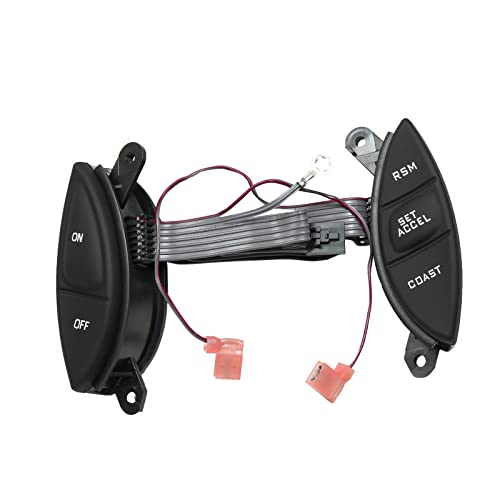
✦ 【Replace OEM Part Number】F87Z9C888BB F87Z-9C888-BB F87A9D809BA F87A-9D809-BA 901-399 SW5928
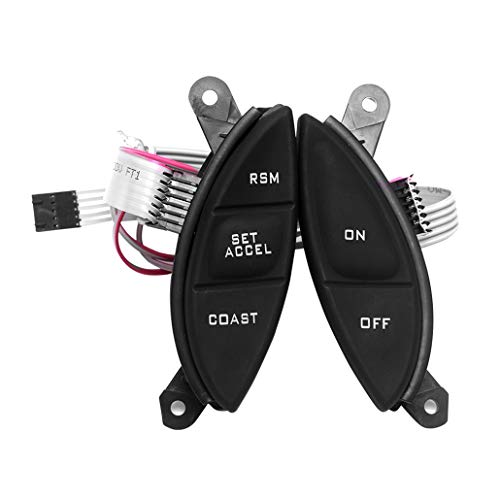
Vehicle Fitment: Fit for 1998-2003 Ford Ranger,1998-2002 Ford Explorer, 2001-2003 Ford Explorer Sport, 2001-2005 Ford Explorer Sport Trac, 2001-2003 F150 Truck Harley Davidson Edition,1999-2004 F150 Lightning, 1998-2001 Mercury Mountaineer, 1995-2003 Mazda B3000 Pickup
Initial Vehicle Setup
- Check Software Version: Confirm your vehicle’s software is up to date. Access the vehicle settings via the main menu.
- Connect to Wi-Fi: Connect your vehicle to a Wi-Fi network. Use the touchscreen to navigate to the Wi-Fi settings.
- Install Updates: Follow the on-screen prompts to install any available software updates. Complete the installation process before proceeding.
Activating Blue Cruise Features
- Locate the Blue Cruise Button: Find the Blue Cruise button on your steering wheel. It typically displays an icon resembling a steering wheel.
- Engage Adaptive Cruise Control: Press the adaptive cruise control button to activate the feature. Adjust your speed as desired.
- Activate Blue Cruise: Once cruising at your desired speed, press the Blue Cruise button. The system will confirm activation with a visual cue on the dashboard.
- Verify Road Compatibility: Ensure you’re on a Blue Cruise-enabled highway. Look for designated highway signs that indicate compatibility.
- Monitor System Response: Observe the system’s ability to steer, accelerate, and brake. Ensure it aligns well with your speed and lane position.
- Stay Attentive: Keep your hands near the steering wheel, ready to take control if prompted. Pay attention to visual and audible alerts.
- Evaluate Overall Performance: Assess how smoothly the system manages driving. If any issues arise, immediately disengage Blue Cruise and manually control the vehicle.
Troubleshooting Common Issues
Even with advanced technology, you might encounter issues while using Ford Blue Cruise. Here’s how to address some common problems.
Recommended Products

Everything You Need, Nothing Missing: Unlike swabs-only kits that leave you buying each tool separately, the Altura Photo Camera Cleaning Kit includes everything in one hard-shell carrying case - 6 individually wrapped, vacuum-sealed, lint-free factory-sealed 24mm full-frame dry sensor swabs, Altura Photo All-Natural 2oz cleaning solution, air blower, lens cleaning pen, lens brush, 50 sheets of tissue lens paper, and MagicFiber microfiber cloths. One kit, every tool you need, always organized and protected.

COMPLETE CAMERA CLEANING KIT: Our camera lens cleaning kit includes an all-natural, alcohol & ammonia-free lens cleaner spray, cleaning brush, lens pen, air blower, MagicFiber microfiber cloths (3), and lens tissue paper wipes (50). Most competing lens cleaning kits cost more and still make you buy the spray and brush separately. Ours doesn't.

Everything You Need, Nothing Missing: Unlike swabs-only kits that leave you buying each tool separately, the Altura Photo Camera Cleaning Kit includes everything in one hard-shell carrying case - 6 individually wrapped, vacuum-sealed, lint-free factory-sealed 16mm full-frame dry sensor swabs, Altura Photo All-Natural 2oz cleaning solution, air blower, lens cleaning pen, lens brush, 50 sheets of tissue lens paper, and MagicFiber microfiber cloths. One kit, every tool you need, always organized and protected.
Connection Problems
Connection issues can disrupt the functionality of Blue Cruise. Ensure your vehicle’s software is updated, as outdated software can cause the system to malfunction. Check your Wi-Fi connection regularly to confirm it’s stable. If you can’t connect, try restarting your vehicle’s infotainment system. Make sure your device isn’t too far away and that there are no obstacles blocking the signal. If problems persist, consider resetting the system to its factory settings.
Sensor Malfunctions
Sensor malfunctions hinder the performance of the Blue Cruise system. Ensure that the sensors are clean and free from dirt, ice, or debris. Regularly inspect the front camera and radar sensors located in the grille area. If sensor readings are incorrect, a recalibration might be necessary. If you notice discrepancies while driving, pull over safely and restart the vehicle. Should issues continue, visiting a certified Ford dealership for professional servicing is advisable.
Conclusion
Activating Ford’s Blue Cruise can transform your driving experience into something more enjoyable and less stressful. By following the steps outlined and keeping an eye on your vehicle’s performance you can take full advantage of this innovative technology.
Don’t forget to address any issues promptly to ensure a smooth ride. With a little practice you’ll be cruising hands-free in no time. Enjoy the journey ahead and drive safely!
Frequently Asked Questions
What is Ford’s Blue Cruise technology?
Ford’s Blue Cruise is a hands-free driving system designed for highway use. It utilizes advanced sensors, cameras, and radar to enhance driving comfort, reduce fatigue, and improve safety.
How do I activate Blue Cruise?
To activate Blue Cruise, ensure your vehicle is on a designated highway, press the Blue Cruise button on the steering wheel, and follow the prompts. Remember, you must keep your eyes on the road.
What should I do if I’m experiencing connection problems?
If you’re facing connection issues with Blue Cruise, check your vehicle’s software version and update it if necessary. Ensure your Wi-Fi is stable, and then restart the system.
How can I troubleshoot sensor malfunctions?
For sensor malfunctions, clean the sensors thoroughly to remove any dirt or debris. If problems persist, consider updating your vehicle’s software or seeking professional servicing.
How does Blue Cruise monitor driver attentiveness?
Blue Cruise uses an in-cabin camera to monitor driver attentiveness. If it detects a lack of focus, it will issue alerts and can disengage if necessary to ensure safety.

Ben Wilkinson is a an experienced mechanic with over 10 years of experience in the automotive repair industry. He is highly skilled in diagnosing and repairing a wide range of car-related issues, from basic maintenance tasks to more complex repairs.