
Key Takeaways
- Understanding Airbag Codes: Airbag codes, triggered by warning lights, reveal issues within the vehicle’s airbag system, essential for maintaining safety on the road.
- Common Codes and Their Meanings: Familiarize yourself with codes like B0010 (driver’s airbag issue) and B0020 (passenger airbag fault) to better diagnose problems.
- Tools Required: Use an OBD-II scanner specifically capable of reading airbag codes, and a multimeter to check electrical connections and diagnose wiring issues.
- Troubleshooting Steps: After retrieving codes, inspect wiring, reset the codes, and consult a professional mechanic for persistent problems.
- Manufacturer Variations: Airbag codes can differ by vehicle make; always consult your service manual for specific interpretations and troubleshooting tailored to your model.
- Safety Risks of Ignoring Codes: Never ignore airbag warning lights, as they signal potential safety risks that could impact your vehicle’s performance in an accident.
Ever wondered what those airbag warning lights mean on your dashboard? You’re not alone. Many drivers face the frustration of seeing that light pop up and feeling unsure about what to do next. Ignoring it isn’t an option, as it could signal a serious issue with your vehicle’s safety system.
Understanding Airbag Codes
Airbag codes indicate issues with your vehicle’s airbag system. These codes usually appear when the airbag warning light turns on. Understanding these codes is essential for ensuring your safety on the road.
Common Airbag Codes
- B0010: This code signals a problem with the driver’s airbag. Inspect wiring and connections.
- B0020: This code points to an issue with the passenger’s airbag. Check sensor functionality.
- B0030: This indicates a fault with side-impact airbags. Evaluate side impact sensors.
- B0040: This code usually pertains to the seat belt pretensioner. Look into pretensioner operation.
- B0050: This signifies problems with the airbag control module. Verify module health.
Reading Airbag Codes
To read airbag codes, you’ll need an OBD-II scanner. Follow these steps:
- Purchase or borrow an OBD-II scanner: Ensure it can read airbag codes specifically.
- Locate the OBD-II port: Usually found under the dashboard near the driver’s seat.
- Plug in the scanner: Turn on your vehicle’s ignition but don’t start the engine.
- Follow scanner prompts: Navigate to the airbag module section to retrieve codes.
- Document the codes: Write down the codes for further analysis.
Troubleshooting Tips
After identifying airbag codes, take these troubleshooting steps:
- Inspect wiring: Check for frayed or disconnected wires.
- Clear codes: Use the scanner to erase codes after repairs. Monitor if the light returns.
- Consult a professional: Reach out to a certified mechanic for complex issues.
Additional Insights
Airbag codes differ by manufacturer. Refer to your vehicle’s service manual for specifics. Some codes might not trigger a warning light. Regularly check your airbag system, especially after accidents. Ignoring airbag issues poses safety risks.
Tools Required for Reading Airbag Codes
Reading airbag codes requires specific tools to access and interpret the information properly. Below are the essential tools you need.
Recommended Products

[Easy to Use—Work Out of the Box] + [FOXWELL 2026 New Version] FOXWELL NT604 Elite scan tool is the 2026 new version from FOXWELL, designed for car owners who want to figure out the cause of issues before fixing car problems by scanning common systems like ABS, SRS, engine, and transmission. The NT604 Elite obd2 scanner diagnostic tool comes with the latest software—no need to waste time downloading software first. Plug the scanner into the OBDII port with OBDII cable to start the diagnosis.

[Check Before You Buy] - BLCKTEC 430 and the App RepairSolutions2 can only be used in the USA and Canada, other countries and regions will not be supported. While the product works on most OBD2-compliant vehicles 1996-2023 models, available functions may vary by make and model. Before purchasing, be sure to use the Compatibility Checker on BLCKTEC website or contact our customer support to ensure the features you need are supported.
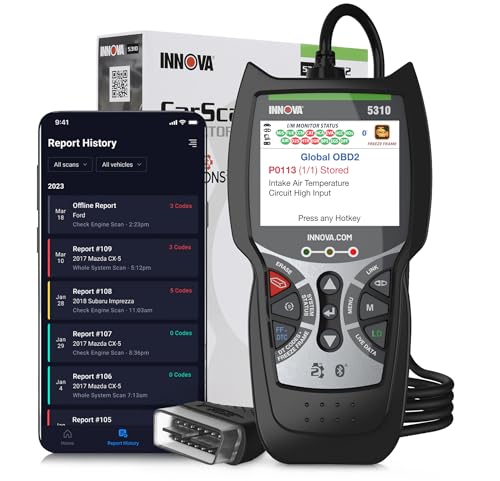
DIAGNOSE ABS & SRS ISSUES - The 5310 OBD2 scanner diagnostic tool helps you quickly find and fix vehicle problems. Use the mobile scanner for car with the OBD2 Bluetooth application RepairSolutions2, available on App Store or Google Play, for real-time solutions. With this car scanner, access verified fixes, purchase exact repair parts, view maintenance schedules, and explore Innova’s wireless code readers & scan tools database. Vehicle coverage may vary. Please use Innova’s Coverage Checker to verify compatibility.
OBD-II Scanner
An OBD-II scanner is crucial for reading airbag codes. It connects to your vehicle’s diagnostic port, typically located under the dashboard.
- Choose a Scanner: Opt for a scanner that specifically supports airbag codes as not all OBD-II scanners read these codes.
- Connect the Scanner: Plug the scanner into the OBD-II port. Turn the ignition on, but don’t start the engine.
- Retrieve Codes: Follow the scanner’s instructions to access the airbag system. The scanner displays the trouble codes, aiding in diagnosing the issue.
- Interpret Codes: Use the scanner’s manual or an online resource to interpret the codes. This step helps identify which component might be malfunctioning.
Multimeter
A multimeter helps check electrical connections related to the airbag system. It’s essential for diagnosing wiring issues.
- Set Up the Multimeter: Turn the multimeter on and select the voltage or resistance setting, depending on the test required.
- Test Connections: Check voltage at the airbag connector and other relevant components. Proper voltage is critical for the airbag system to function correctly.
- Inspect for Resistance: Measure the resistance of the airbag circuits. Any irregular readings could indicate a problem.
- Confirm Findings: Compare your readings with the manufacturer’s specifications. This ensures the airbag system operates within required parameters.
These tools enable thorough diagnostics of airbag systems, ensuring safety in your vehicle.
Steps to Read Airbag Codes
Reading airbag codes can help identify issues with your vehicle’s safety system. Follow these steps to accurately interpret the codes and ensure your vehicle’s safety.
Recommended Products

[Diagnose Like a Pro] BlueDriver Pro is a professional OBD2 scanner and diagnostic tool that helps you scan, understand, and clear vehicle trouble codes with confidence. Turn your phone into a powerful car diagnostic scanner—no guesswork, no unnecessary repairs.

【AI-Powered Vehicle Diagnosis】Experience smarter car diagnostics with the V800 AI OBD2 Scanner. Featuring AI fault code analysis and intelligent Q&A, it helps explain diagnostic results, analyze possible causes, and provide repair suggestions. With a built-in database of 200,000+ fault codes, V800 makes complex vehicle problems easier to understand for both DIY users and professionals.
Connecting the Scanner
- Locate the diagnostic port. Find the OBD-II connector, usually located under the dashboard near the driver’s seat.
- Plug in the scanner. Insert the OBD-II scanner’s connector into the port, ensuring a secure fit.
- Turn on the ignition. Start your vehicle or turn the key to the “On” position without starting the engine. This powers the scanner.
- Select the airbag system. Use the scanner’s menu to navigate to the airbag or SRS (Supplemental Restraint System) function to read the codes.
Interpreting the Codes
- Retrieve the codes. Follow the scanner’s prompts to access stored airbag codes. Take note of any numbers displayed.
- Look up the codes. Refer to the vehicle’s service manual or an online database for explanations of each code. For example, B0010 indicates a driver’s airbag fault, while B0020 refers to a passenger’s airbag issue.
- Assess the severity. Determine whether the codes indicate a minor or critical issue. Some codes may require immediate attention to ensure safety.
- Document your findings. Keep a record of any codes retrieved, along with their descriptions and suggested next steps. This information helps in troubleshooting and when consulting a professional if necessary.
Common Airbag Codes and Their Meanings
Understanding common airbag codes is essential for diagnosing issues within your vehicle’s safety system. These codes provide critical information about malfunctioning components. Below are some typical airbag codes you might encounter, along with their meanings.
B0010 – Driver’s Airbag Circuit
- Meaning: This code indicates a problem with the driver’s airbag circuit. It could stem from a wiring issue, a faulty airbag, or a malfunctioning airbag module.
B0020 – Passenger’s Airbag Circuit
- Meaning: This code signals an issue with the passenger’s airbag circuit. Similar to B0010, this code can arise from wiring faults or problems with the airbag itself.
B0030 – Side Airbag Circuit
- Meaning: This code pertains to the side airbag circuit, indicating a potential problem with the side airbag system. Look for damaged wires or issues within the airbag module.
B0035 – Side Impact Sensor
- Meaning: This code indicates a fault in the side impact sensor, which may not be responding properly during a crash. Check sensor connections for reliability.
B0040 – Seatbelt Pretensioner
- Meaning: This code is related to the seatbelt pretensioner, which helps keep you secure during a crash. If there’s a malfunction, examine the pretensioner and connections.
B0080 – Airbag Module
- Meaning: This code suggests an issue with the airbag control module. Inspect the module and its connections for any signs of wear or damage.
B0090 – Resistance Too High
- Meaning: This code indicates high resistance in the airbag circuit. This often points to a wiring issue. Conduct a thorough inspection of the relevant circuits.
Troubleshooting Tips
- Inspect Wiring: Look for frayed wires or poor connections. Damage often causes code triggers.
- Check Sensors: Verify that all airbag sensors function correctly. Sensor issues can activate warning lights.
- Consult the Manual: Reference your vehicle’s service manual for code specifics and solutions tailored to your model.
By familiarizing yourself with these common airbag codes, you’ll be better equipped to diagnose potential problems in your vehicle’s safety system effectively.
Troubleshooting Common Issues
When reading airbag codes, several common issues may arise. Addressing these effectively ensures your vehicle’s safety system operates properly.
Recommended Products

CEL Doctor: The ANCEL AD310 is one of the best-selling OBD II scanners on the market and is recommended by Scotty Kilmer, a YouTuber and auto mechanic. It can easily determine the cause of the check engine light coming on. After repairing the vehicle's problems, it can quickly read and clear diagnostic trouble codes of emission system, read live data & hard memory data, view freeze frame, I/M monitor readiness and collect vehicle information

Understand Your Check Engine Light – The ANCEL AD410 OBD2 scanner helps everyday drivers quickly read and clear engine-related fault codes, view code definitions, and understand why the check engine light is on before visiting a repair shop. With 42,000+ built-in DTC lookups, this car code reader helps reduce guesswork and makes basic vehicle diagnostics easier for beginners and DIY users

【Diagnose Check Engine Light in Seconds – No Mechanic Needed】The FOXWELL NT301 OBD2 scanner instantly reads & clears engine fault codes (DTCs) with one click. Simply plug into the 16-pin DLC port, turn ignition on, and get accurate results within seconds—No prior car knowledge required. Save hundreds on dealership fees by knowing exactly what’s wrong before you visit a shop. The #1 choice car scanner for DIYers and car owners who want to take control of their vehicle’s health
Airbag Warning Light Remains On
If your airbag warning light stays on after addressing a code, check the following:
- Connector Issues: Ensure all connectors related to the airbag system are secure and free of corrosion. Loose connections can cause persistent warnings.
- Faulty Scanner: Confirm that your OBD-II scanner supports airbag codes and functions correctly. Incompatible or damaged scanners may give misleading readings.
- Incomplete Reset: After repairs, make sure the codes are cleared using the scanner. Faulty codes may linger if not properly reset.
Inconsistent Code Readings
Inconsistent airbag code readings can indicate several problems. You might:
- Check Battery Voltage: Low battery voltage can affect the code’s accuracy. Test the battery to ensure it’s sufficiently charged.
- Inspect Grounding: A poor ground connection can lead to erratic sensor behavior. Check grounding points for cleanliness and tightness.
- Reconnect Scanner: Disconnect and reconnect your scanner to rule out temporary glitches in communication.
Error Codes Not Listed
If your scanner retrieves error codes not documented in your vehicle’s manual:
- Manufacturer-Specific Codes: Some error codes can be unique to the manufacturer. Look for a specific database or forum pertinent to your vehicle brand for assistance.
- Software Updates: Ensure that your scanner’s software is up to date. Manufacturers frequently update code definitions with new releases.
Difficulty Clearing Codes
If you’re unable to clear codes after addressing issues, consider:
- Consulting the Manual: Refer to the vehicle’s service manual for specific instructions on clearing airbag codes.
- Battery Disconnect: Disconnecting the battery for a few minutes can sometimes reset all electronic systems, including airbag codes.
- Professional Help: If problems persist, contact a qualified technician. In-depth diagnostics may uncover underlying issues that require professional expertise.
Unexplained Airbag Codes
For unexpected airbag codes, take these steps:
- Visual Inspection: Conduct a thorough visual inspection of the airbag components and wiring for signs of wear or damage.
- Diagnostic Scan: Perform a complete diagnostic scan of the vehicle to identify other potential issues affecting the airbag system.
- Seek Advanced Diagnostics: If necessary, utilize a professional scanning tool that provides more detailed information and troubleshooting guidance for the airbag system.
These troubleshooting tips should help you diagnose and resolve common issues effectively, ensuring your airbag system remains reliable for your safety on the road.
Conclusion
Understanding airbag codes is crucial for your safety on the road. By taking the time to read these codes and troubleshoot any issues, you’re not just addressing a warning light; you’re ensuring that your vehicle’s safety system is functioning properly.
With the right tools like an OBD-II scanner and a little patience, you can easily navigate the world of airbag diagnostics. Don’t hesitate to reach out to a professional if you encounter any complex problems. Staying proactive about your vehicle’s airbag system can make all the difference in keeping you and your passengers safe.
Frequently Asked Questions
What does an airbag warning light mean?
The airbag warning light indicates a potential issue with the vehicle’s airbag safety system. It signals that the airbags may not deploy properly in an accident, which can put occupants at risk. It’s crucial to address this warning promptly.
How do I read airbag codes?
To read airbag codes, you need an OBD-II scanner. Connect the scanner to the vehicle’s diagnostic port, turn on the ignition, and select the airbag system function. The scanner will then retrieve the airbag codes for you to analyze.
What are common airbag codes?
Common airbag codes include B0010 (Driver’s Airbag Circuit), B0020 (Passenger’s Airbag Circuit), and B0030 (Side Airbag Circuit). Each code indicates specific issues with the airbag system and should be looked up for detailed meanings and troubleshooting steps.
Why is it important to check airbag codes regularly?
Regular checks on airbag codes ensure that your airbag system is functioning correctly and can deploy in emergencies. This helps maintain the overall safety of your vehicle, protecting occupants during accidents.
How can I troubleshoot airbag warning light issues?
To troubleshoot airbag warning light issues, check the vehicle’s wiring, connectors, and battery voltage. If the light persists, use an OBD-II scanner to read and clear the codes, or consult a professional for further assistance if needed.
What tools do I need to read airbag codes?
You need an OBD-II scanner that supports airbag codes to read them effectively. A multimeter can also be helpful for checking electrical connections related to the airbag system.
Can I clear airbag codes myself?
Yes, you can clear airbag codes using an OBD-II scanner, but it’s essential to address the underlying issues first. If the problem persists, consult a professional to avoid safety risks.

Ben Wilkinson is a an experienced mechanic with over 10 years of experience in the automotive repair industry. He is highly skilled in diagnosing and repairing a wide range of car-related issues, from basic maintenance tasks to more complex repairs.